Why GPUs Are Eating Compute Stack
A decade ago, "let it run overnight" was an acceptable answer. Today, that timeline is obsolete.
Training a large language model, backtesting a trading strategy across millions of scenarios, pricing a complex derivative portfolio, running climate simulations with billion-cell grids—these workloads now operate under second-to-minute SLAs, not hour-to-day timelines.
Meanwhile, Moore's Law has decelerated while data volumes and model complexity have exploded exponentially. This fundamental tension has reshaped the computing landscape: general-purpose CPUs no longer serve as the sole computational engine, and massively parallel GPUs have migrated from graphics rendering into the core of AI training, quantitative research, and scientific computing.
The Rise of GPUs in the AI Era
In recent years, the GPU has emerged as a powerhouse for specific computational workloads, often outperforming CPUs by orders of magnitude. GPU-accelerated computing—leveraging thousands of simple processors working in parallel—has shifted from niche to mainstream. Here's why.
Origins: Built for Graphics, Optimized for Parallelism
GPUs were originally designed to accelerate graphics rendering, starting with NVIDIA's GeForce 256 in 1999. Their job? Apply the same operations (matrix and vector math) to millions of pixels simultaneously. This "massively parallel" architecture is fundamentally different from CPUs, which prioritize versatility and low latency for diverse tasks.
Think of it this way: A CPU is like a brilliant professor who can solve any problem individually. A GPU is like an army of students—each handling simple arithmetic, but together they can crunch through a massive multiplication table far faster than any single expert.
The Computational Shift: From Logic to Volume
GPU acceleration didn't take off because someone suddenly "discovered" GPUs are good at math—it's because the nature of computation fundamentally changed. In the AI era, workloads have shifted from complex control logic to massive-scale simple operations. A single modern matrix multiplication can involve billions of multiply-accumulate operations, mapping perfectly to the GPU's SIMT (Single Instruction, Multiple Threads) architecture where thousands of cores execute identical operations on different data simultaneously.
Breaking Through the Memory Wall
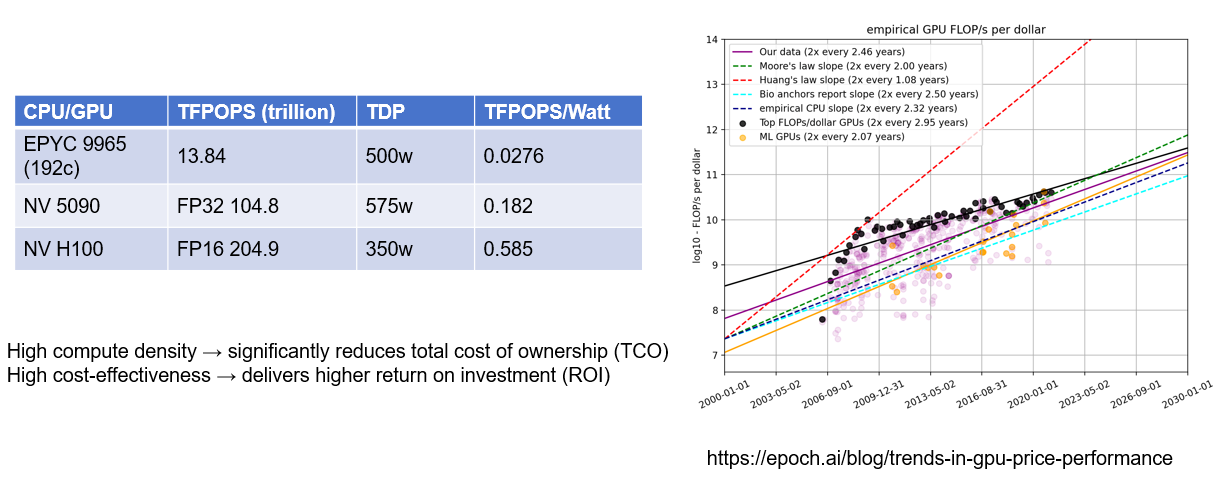
Traditional CPU cache hierarchies (L1/L2/L3) struggle with terabyte-scale datasets, creating severe memory bottlenecks. GPUs address this with high-bandwidth memory—the H100, for example, delivers 3 TB/s—combined with streaming execution that keeps compute units constantly fed with data. The efficiency gains are dramatic: for parallel workloads, GPUs can deliver 10-20× higher performance per watt than CPUs. With the same power budget, GPUs simply compute more.
Meet DolphinDB Shark
In production environments, DolphinDB handles increasingly compute-intensive workloads—quantitative factor calculations, exotic options pricing (snowball structures, autocallables), coupon rate optimization, and multi-dimensional Monte Carlo simulations. For many of these tasks, traditional CPU architectures have reached a critical threshold: the question is no longer "how fast can we compute this?" but "can we compute this at all within acceptable timeframes?"
To deliver a faster and more convenient acceleration experience for customers, Shark was created. Shark was built to deliver GPU performance without GPU complexity. Users simply add an @gpu tag before any user-defined function—no CUDA development, no code rewrites—and immediately unlock 10-100× performance improvements over CPU-only execution.
The core design principle: Make existing DolphinDB code GPU-compatible with minimal or zero modification, delivering acceleration almost transparently.
What is Shark?
At its core, Shark is a compiler and scheduler. It automatically translates DolphinDB functions into GPU-executable machine code. Beyond standalone compute tasks, Shark exposes GPU capabilities to other DolphinDB modules—such as the backtesting and streaming engines—through callback functions, enabling end-to-end acceleration across the platform.
Shark's Four Key Advantages:
- Low learning curve: No CUDA expertise required—developers work entirely in familiar DolphinDB syntax.
- Zero migration overhead: Zero script changes; transparent acceleration with a single line of code.
- Production-grade performance: Achieves performance comparable to hand-optimized CUDA kernels through automated compilation.
- Comprehensive coverage: Supports the full set of 2,000+ DolphinDB operators, covering complete workflows in quantitative finance and IoT analytics.
Inside Shark: A Deep Dive into Its Three Core Engines
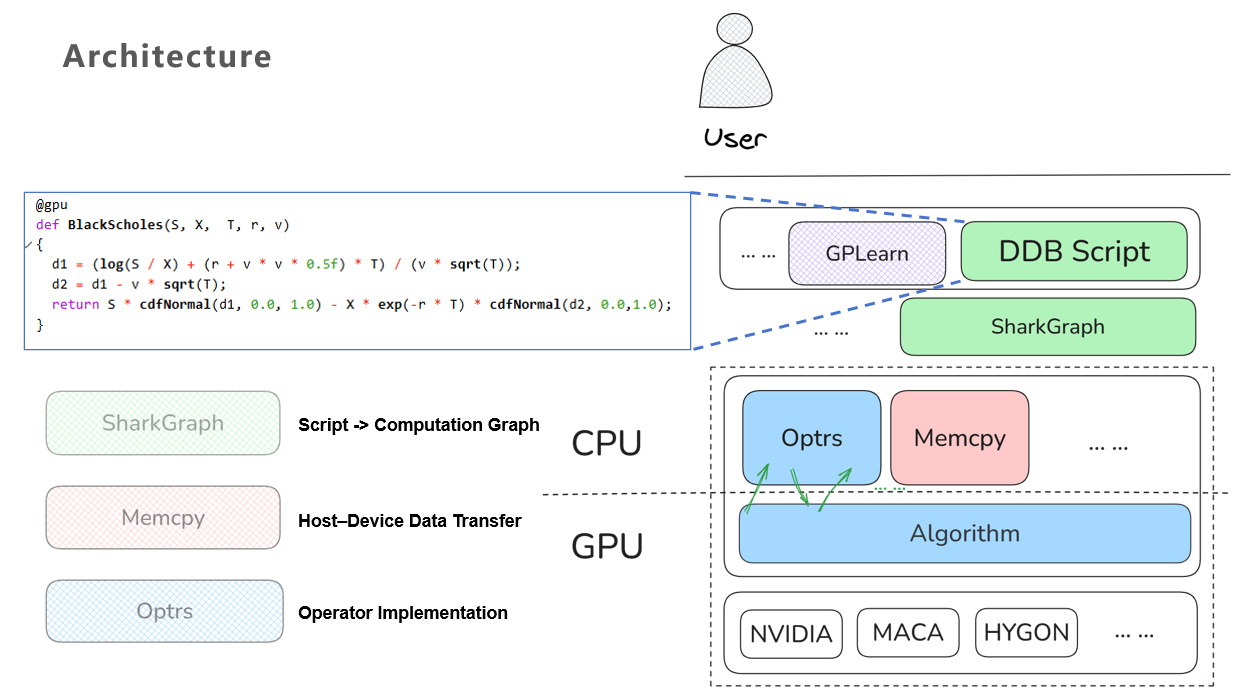
The architecture diagram below illustrates how Shark achieves seamless CPU-to-GPU migration through three interconnected modules:
- SharkGraph : Compiles DolphinDB scripts into optimized computation graphs
- Memcpy : Handles asynchronous host-to-device data transfers
- Optrs : Implements GPU operators using template metaprogramming
SharkGraph: Three-Stage Compilation Pipeline
Stage 1: AST Normalization
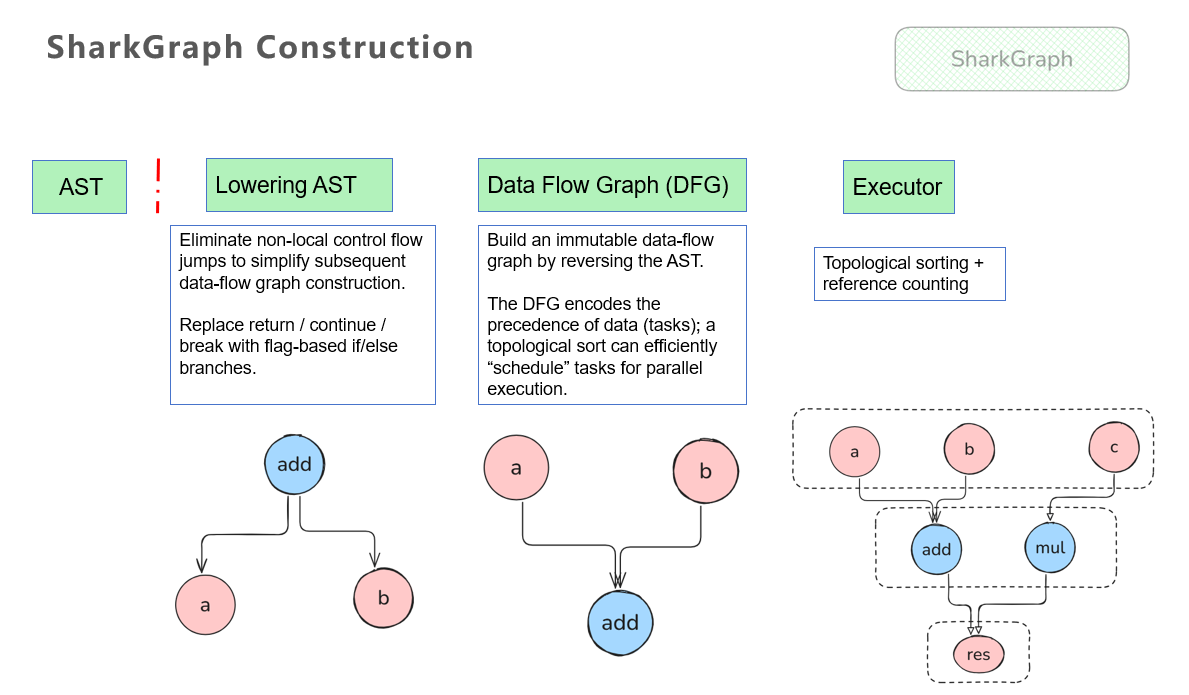
Shark begins by preprocessing the abstract syntax tree (AST) of DolphinDB scripts, eliminating non-local control flow that would complicate GPU execution. Jump statements like return and break are transformed into structured control flow using flag variables and conditional branches.
Stage 2: Data Flow Graph Construction
The normalized AST is converted into a data flow graph (DFG), where nodes represent computational operations and edges represent data dependencies. Shark performs static analysis and optimization on this graph—the resulting structure explicitly encodes parallelization opportunities, allowing the GPU scheduler to identify independent tasks that can execute concurrently.
Stage 3: Execution Scheduling
Topological sorting determines the correct execution order while respecting data dependencies. Reference counting tracks data lifetime, enabling immediate memory reclamation when intermediate results are no longer needed—critical for managing GPU memory constraints.
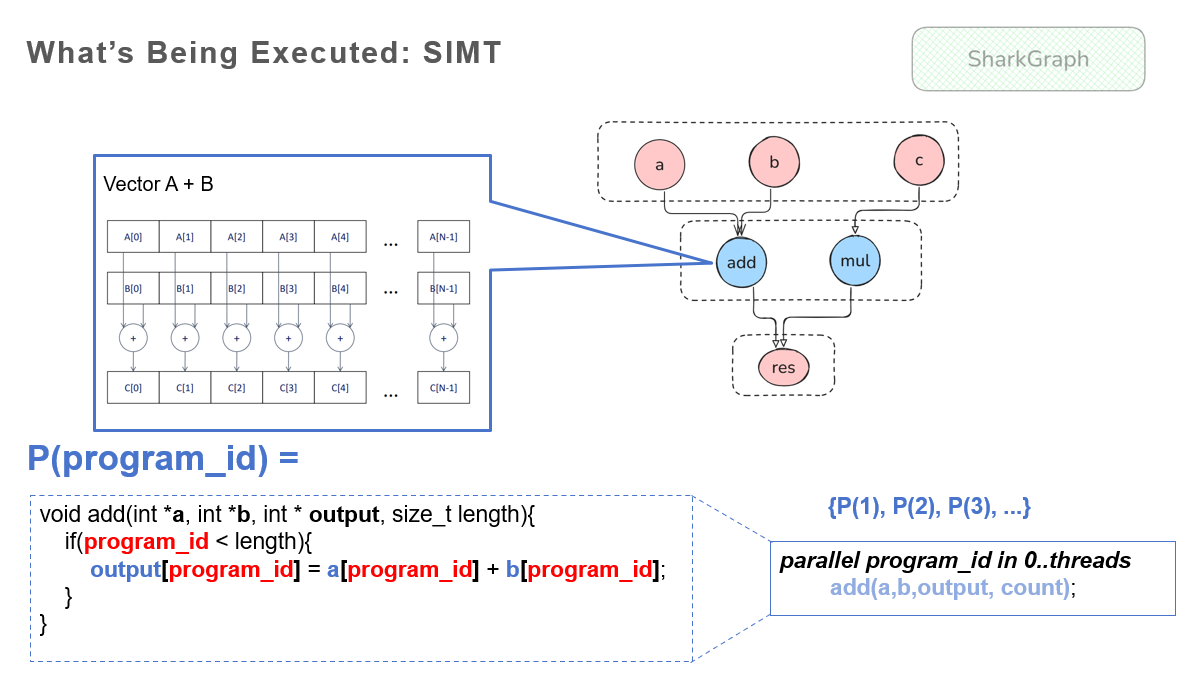
At its core, GPU programming follows the SIMT (Single Instruction, Multiple Threads) model. In simple terms, SIMT means you have a set of tasks that can be parallelized; you only need to define a task function P(i)—for example, for vector addition, P(i) = a[i] + b[i]. The GPU then automatically applies this function in parallel to tens of thousands of indices. Each node in Shark’s data flow graph is a perfect mapping to this SIMT model.
Memcpy: Asynchronous Data Transfer
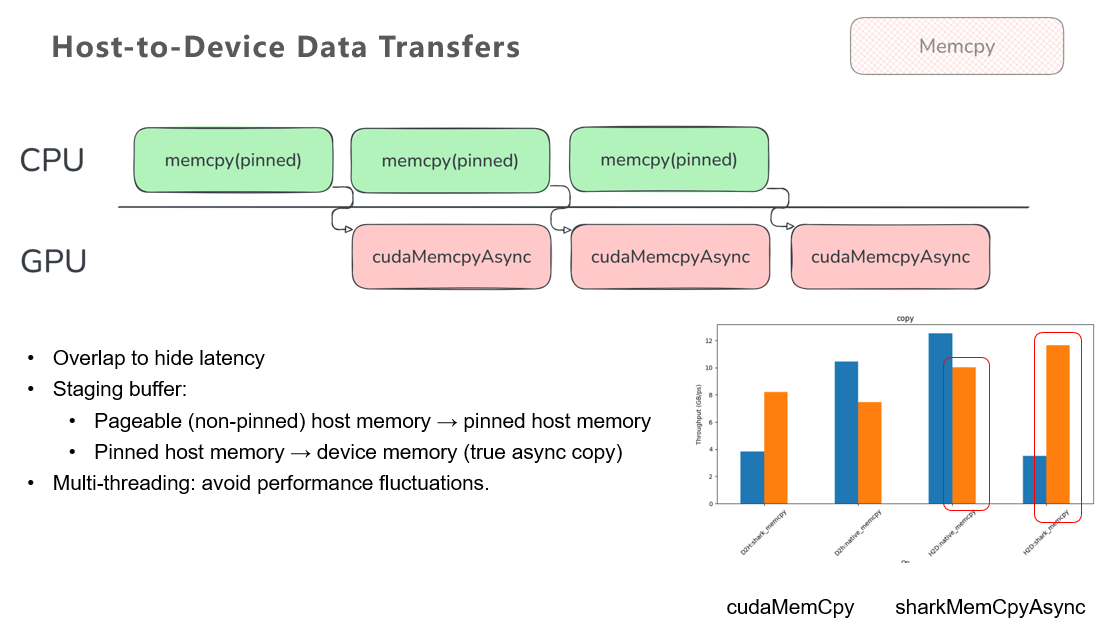
In heterogeneous computing, I/O bottlenecks often overshadow raw compute performance. Data must be transferred from host (CPU) to device (GPU), and effective acceleration depends on overlapping these transfers with computation to hide latency. However, standard CUDA APIs like cudaMemcpyAsync become effectively synchronous when operating on regular pageable memory due to virtual memory system constraints—eliminating the intended parallelism benefit.
To address this, Shark implements its own sharkMemCpyAsync, a specialized transfer engine built on two key techniques:
- Pinned Memory Staging Buffers: Since pageable memory cannot be copied asynchronously to GPUs, Shark uses small pinned (page-locked) memory blocks as intermediate staging areas. A dedicated thread continuously moves data from pageable memory into pinned buffers, which are then transferred asynchronously to the GPU. This creates a pipelined "assembly line" where data movement and GPU transfer overlap continuously.
- Multi-Threaded Copy Pipeline: Multiple parallel copy threads mitigate performance variability from OS scheduling and underlying memcpy implementation differences. Multi-threading smooths out fluctuations that would otherwise cause unpredictable latency spikes.
Benchmarks demonstrate that this approach not only enables true asynchronous transfer from regular memory, but delivers an additional ~10% throughput improvement over standard methods.
Optrs: Template-Metaprogrammed Operator Library
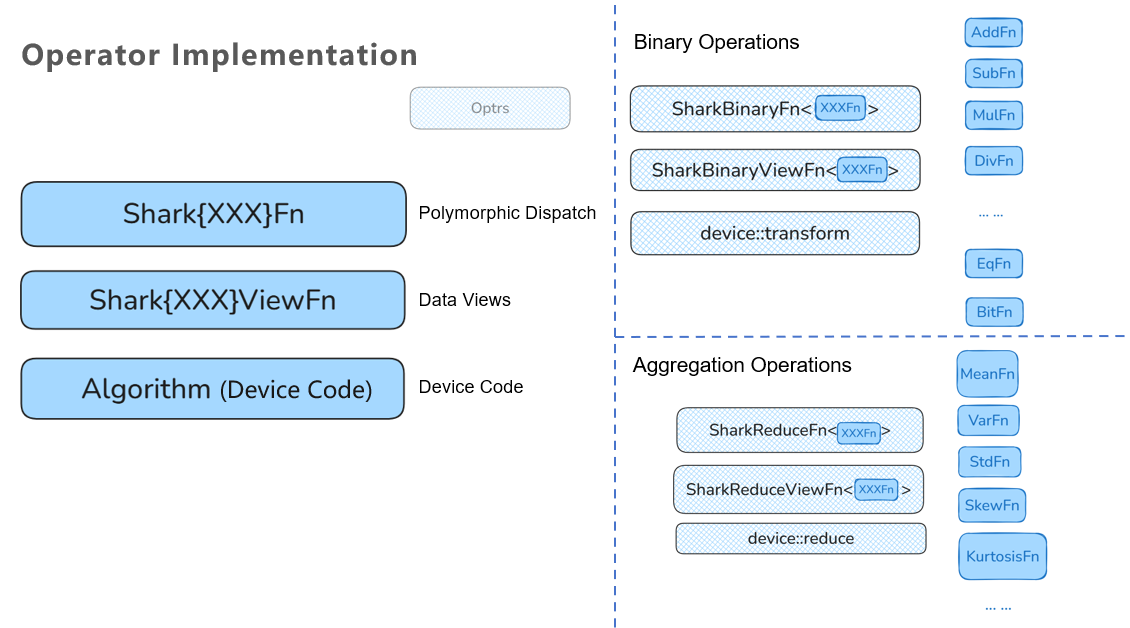
Operator implementation represents Shark's most significant engineering investment. DolphinDB supports over 2,000 data analysis operators, each of which must handle:
- 7 data types: BOOL, CHAR, SHORT, INT, LONG, FLOAT, DOUBLE
- 4 data forms: scalar, vector, matrix, table
- Core constraint : Zero-copy execution with no temporary allocations
This creates a combinatorial explosion: every function must be implemented for each supported type, and only by defining behavior across all type combinations can true polymorphism be achieved.
DolphinDB addresses this complexity through a layered design:
- Polymorphic Dispatch Layer: Routes operations based on data form (vector, matrix, table) without type-specific logic, directing execution to unified entry points.
- Data View Abstraction Layer: Implements concrete operations (arithmetic, aggregation, comparisons) on abstract "views" rather than raw memory layouts. This decouples algorithm logic from physical data representation.
- Algorithm Implementation Layer: Contains actual GPU code that interfaces with CUDA/OpenCL backends.
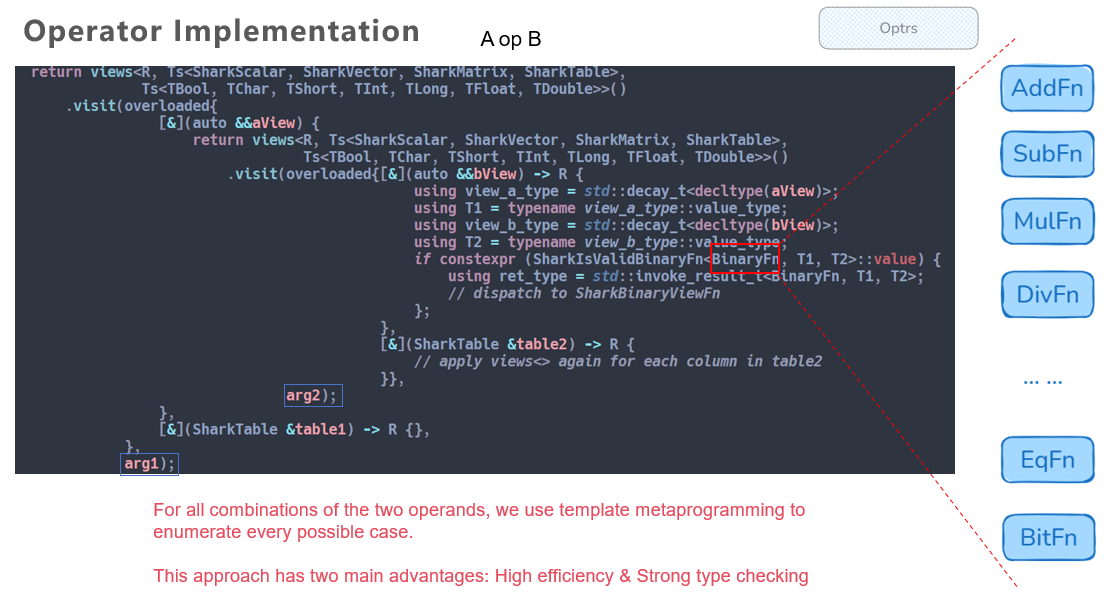
Consider a binary operator operating on two inputs. Each input is a "view" representing the Cartesian product of {data forms} × {data types}. Two views together create a four-dimensional nested loop when fully expanded—repetitive logic differing only in the specific function object applied.
Rather than write this manually, Shark uses template metaprogramming to enumerate all combinations at compile time. The compiler generates specialized code for each type permutation automatically.
- Type safety: All type conversions and null-handling logic are validated at compile time, reducing runtime errors.
- Zero-copy: Template expression techniques allow the compiler to optimize away intermediate allocations, operating directly on source data.
- Optimal performance: Generated machine code rivals hand-optimized CUDA kernels.
Of course, this approach also introduces some downsides: slower compilation and larger binaries. Shark’s trade-off is to split compilation units and compile each index type separately, accepting higher maintenance complexity in return for high runtime performance.
Demonstration Cases
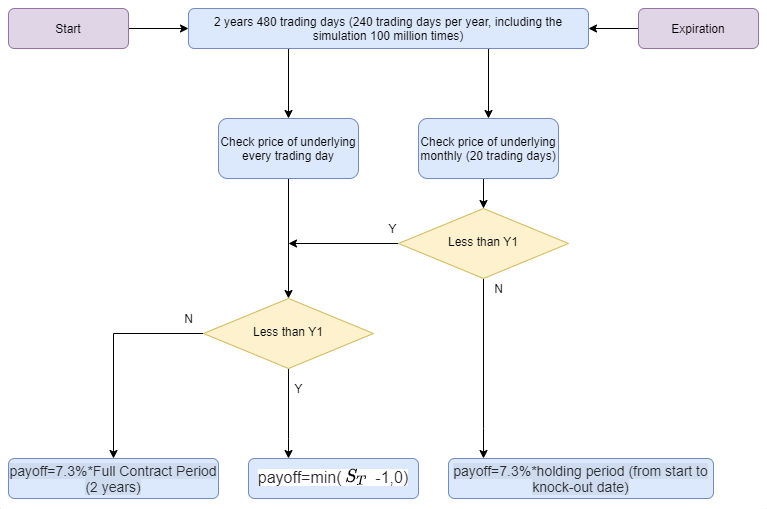
Case 1: Snowball Option Pricing via Monte Carlo Simulation
Snowball options are path-dependent exotic derivatives with complex payoff structures. Pricing these instruments requires numerical simulation—typically Monte Carlo methods with millions of sample paths—making them ideally suited for GPU acceleration.
Performance Results
At 1 million simulation paths, Shark delivers 16.7× speedup over CPU execution. Performance gains scale with workload size:
| Iterations | CPU (128 threads) | Shark GPU | Speedup |
|---|---|---|---|
| 1,000 | 27.38 ms | 2.87 ms | 9.5× |
| 10,000 | 63.39 ms | 6.20 ms | 10.2× |
| 100,000 | 577.26 ms | 40.90 ms | 14.1× |
| 1,000,000 | 6.20 s | 0.37 s | 16.7× |
As path count increases, Shark's advantage grows—demonstrating strong scalability for compute-intensive financial simulations.
Case 2: Genetic Programming for Factor Discovery
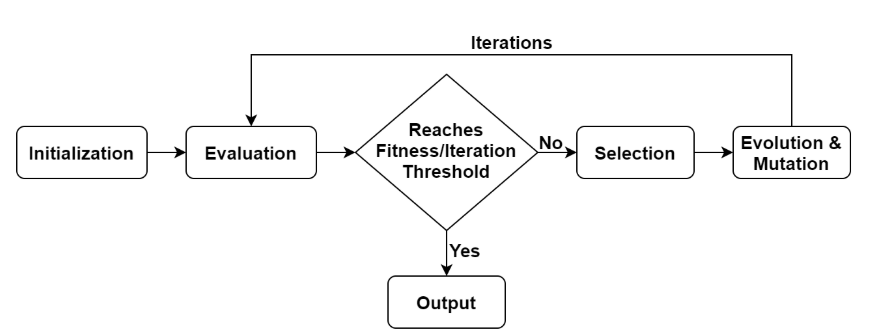
Genetic algorithms are widely used in quantitative finance for automated alpha factor discovery. These algorithms iteratively evaluate and evolve candidate expressions, requiring hundreds or thousands of fitness evaluations—each potentially involving complex computations across large datasets.
Rather than rewriting the entire genetic programming framework, Shark accelerates the bottleneck: fitness evaluation. Users define fitness functions with the @gpu annotation, and Shark transparently executes them on the GPU. Even complex multi-step factor formulas can be wrapped in @gpu functions.
Conclusion
As computation keeps shifting from “a bit of complex logic” to “massive volumes of simple math,” GPUs are becoming the natural home for many AI and quant workloads—but the traditional GPU programming model remains too heavy for most data teams.
DolphinDB Shark sits in that gap: it turns ordinary DolphinDB scripts into SIMT-friendly computation graphs, overlaps host–device transfers with computation, and executes on a template-metaprogrammed operator library that reaches near hand-written CUDA performance—without asking users to write CUDA at all.
Learn More
If you’d like to explore DolphinDB Shark and its GPU acceleration capabilities in more depth, you can:
- Read the official Shark GP learning quick start guide: https://docs.dolphindb.com/en/Tutorials/gplearn_qsg.html
- Download the Shark GPlearn whitepaper: https://dolphindb.com/whitepaper/shark-en
- Try out sample scripts for snowball option pricing via Monte Carlo simulation: https://docs.dolphindb.com/en/Tutorials/shark_graph.html
- Request a free Shark trial: https://dolphindb.com/product#shark
- Learn more about DolphinDB and our products: https://dolphindb.com/