A Practical Order Matching Framework for High-Frequency Strategy Backtesting
In medium- and high-frequency strategy development, the divergence between backtested and live performance is a well-known problem — and transaction costs are usually the culprit. Idealized backtests assume instantaneous, complete fills: a limit order at price P executes at price P the moment the market touches it. What this ignores is everything that actually determines execution quality: queue position, partial fills, order latency, and multi-level slippage. At HFT margins, these are not rounding errors — they determine whether a strategy is profitable.

DolphinDB’s Order Matching Simulator replaces this abstraction with exchange-level matching logic. It ingests L2 snapshot or tick-by-tick data, reconstructs the order book at each point in time, and evaluates your orders against it using price-time priority consistent with SSE and SZSE trading rules. Latency, fill ratio, and order book depth are all configurable — and calibratable against observed live execution.
This post covers the engine’s architecture, walks through matching examples with real L2 order book data, and presents performance benchmarks at scale.
How the Order Matching Simulator Works
The simulator sits between your strategy logic and your output tables, acting as a synthetic exchange matching engine.
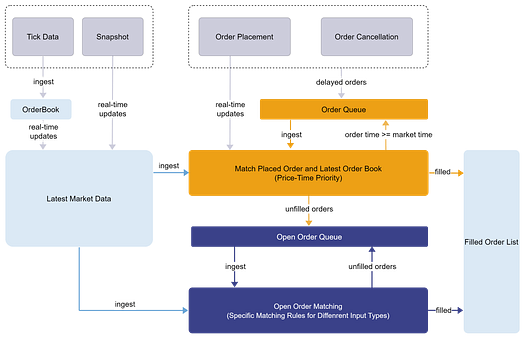
The order matching simulator takes two inputs: the market data and the orders placed by the user. It simulates order matching according to the configured matching rules. Execution results are written to the trade details output table, including partial fills, order rejections, and order cancellations. Any unfilled portion remains pending for subsequent matching or cancellation.
- Supports configurations such asfull ratio and latency.
- When multiple user orders on the same side are matched simultaneously, executions follow price-time priority.
- When the market data is tick-by-tick data, the matching engine builds the market order book in real time. When a user order arrives, it is immediately matched against the order book to generate execution information. Any unfilled portion then joins subsequent market orders and executed orders, and is matched thereafter according to price-time priority.
- When the market data is snapshot data, a user order is immediately matched against the order book upon arrival, generating execution information. Depending on the order matching simulator configuration, any unfilled portion may continue to be matched against subsequent market snapshots.
Matching mode 1: Match against the latest traded price and the opposite-side order book at the configured ratio
Matching mode 2: Match against the list of trades within the interval and the opposite-side order book
Supported user order types include limit, market, and cancel orders. Different combinations of order types and market data types correspond to different matching rules; see later sections for details.
Key configurable parameters:
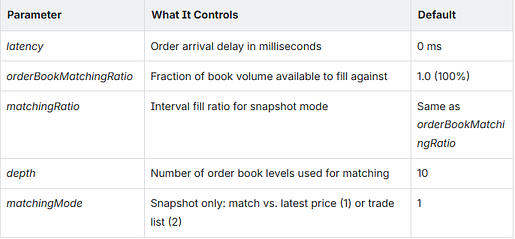
Case Study 1: Order Matching Based on Level 2 Snapshot Data
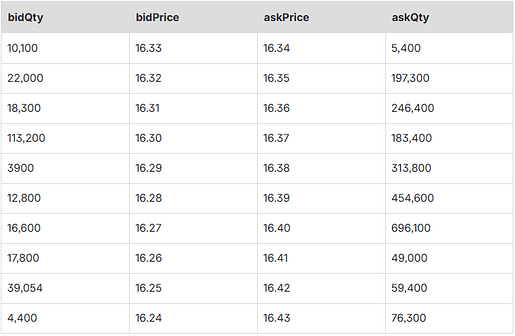
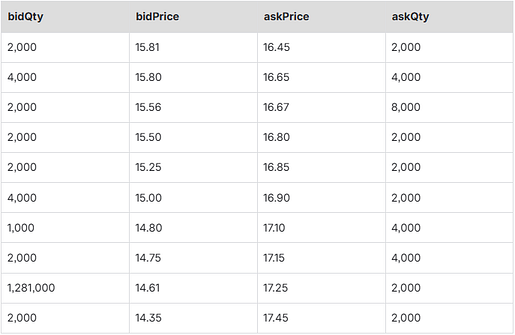
Using the snapshot order book at a specific time 2022.04.14T09:35:00.040 as the reference (Table 1), the latest traded price at that moment is 16.34. A user then places a sell order with a price of 16.32 and a quantity of 50,000. The order is then matched and executed under order matching mode 1 and order matching mode 2, respectively.
- Matching orders using mode 1
In matching mode 1, a limit order is matched immediately against N levels of order book data, and for any unfilled portion of the resting order, subsequent market data is used first to match by price against the latest price within the interval, and then to match and execute sequentially against the order book at the latest point in time. In this scenario, set “matchingMode” to 1 and the interval fill ratio (matchingRatio) to 10%. The other configuration details are as follows:
config = dict(STRING, DOUBLE);
// Market data type: 0 indicates tick-by-tick, 1 indicates snapshot
config["dataType"] = 1;
// Matched order book depth, 5 - 50
config["depth"] = 10;
// Simulated latency, in milliseconds, used to simulate the delay from when a user order is submitted to when it is processed
config["latency"] = 0;
// In tick-by-tick mode, whether to output the order book: 0 = no, 1 = yes
config["outputOrderBook"] = 0;
// If order book output is enabled, the minimum interval for outputting the order book, in milliseconds
config["outputInterval"] = 1;
// Execution percentage against the order book
config["orderBookMatchingRatio"] = 1;
// In snapshot mode, two matching modes are available; set this to 1 or 2
config["matchingMode"] = 1;
// In snapshot mode, the interval execution percentage for each snapshot; by default, this is the same as the execution percentage orderBookMatchingRatio
config["matchingRatio"]=0.1
At time t, the order book is as shown in the above Table. The user submits a sell order at 16.32 for 50,000 shares. The order is immediately executed against opposing orders at 16.33 and 16.32, with execution volumes of 10,100 and 22,000 respectively. The remaining unfilled quantity is 50000–10100–22000 = 17900 shares, which is placed at the best ask level.
MatchingEngineSimulator::insertMsg(engine, ("000001.SZ", 2022.04.15T09:55:15.000, 5, 16.32, 50000, 2, 1) ,2)
select * from tradeOutputTable
The execution details at this point are as follows:
Press enter or click to view image in full size

At the next point in time, the market snapshot order book is shown in Table 2 below. The latest traded price is 16.34, and the interval trading volume is 25,500.
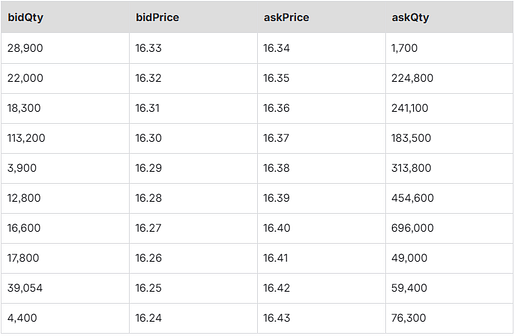
The remaining order is matched against the interval’s latest trade price, resulting in an executed volume of 2550. The remaining quantity, 17900–2550=15350, is then matched against the top bid level. The user’s order is now fully filled. The fill details are as follows:
Press enter or click to view image in full size

The script above is provided in the appendix.
- Match orders using mode 2
In mode 2, limit orders are immediately matched against N levels of order book data. Any unfilled order then enters the resting order process, where they are first matched against trade prices within the interval, and then sequentially matched against the latest order book at the current time. Here, “matchingMode” is set to 2. The other configuration settings are as follows:
config = dict(STRING, DOUBLE);
// Market data type: 0 indicates tick-by-tick; 1 indicates snapshot
config["dataType"] = 1;
// Order book depth for matching, 5-50
config["depth"] = 10;
// Simulated latency in milliseconds, used to model the delay from when a user order is sent to when it is processed
config["latency"] = 0;
// In tick-by-tick mode, whether to output the order book: 0 = no, 1 = yes
config["outputOrderBook"] = 0;
// If order book output is enabled, the minimum interval for outputting the order book, in milliseconds
config["outputInterval"] = 1;
// Fill ratio against the order book
config["orderBookMatchingRatio"] = 1;
// Matching mode for snapshot data, can be set to 1 or 2
config["matchingMode"] = 2;
// Interval fill ratio in snapshot mode; by default, equal to orderBookMatchingRatio
config["matchingRatio"]=0.1
At time t, the order book is shown in Table 1 above. The user submits a sell order at 16.32 for 50,000 shares. The order is immediately matched against the opposing orders at the 16.33 and 16.32 price levels, with fill quantities of 10,100 and 22,000, respectively. The remaining unfilled quantity is 50000–10100–22000=17900, which is placed at the best ask level.
MatchingEngineSimulator::insertMsg(engine, ("000001.SZ", 2022.04.15T09:55:15.000, 5, 16.32, 50000, 2, 1), 2)
select * from tradeOutputTable
The fill details are as follows, identical to those in Mode 1:
Press enter or click to view image in full size

The user order occupies the best position on the sell side. The order book in the next market snapshot, shown in Table 2 above. The interval’s latest trade price list is [16.34,16.33,16.34], and the corresponding volumes are [300,1000,24200]. The order is matched against the transaction prices in the interval trade list. The user’s order is now fully filled. The fill details are as follows:
Press enter or click to view image in full size

The script above is provided in the appendix.
Case Study 2: Order Matching Based on Level 2 Tick-by-Tick Data
The order matching simulator takes order instructions and market data as inputs. When the market data consists of Level 2 tick-by-tick data, the simulator matches user orders in accordance with exchange trading rules, following price-time priority.
Using the market order book at 2022.04.14T09:35:00.040 as a reference, the following examples describe how user orders are matched under different scenarios according to price-time priority.
- Sell 1,000 shares at a limit price of 16.45
At 2022.04.14T09:35:00.040, the best bid was 15.81. Because the price of the order to sell 1,000 shares at a limit price of 16.45 was higher than the best bid of 15.81, the order could not be executed at that time. Looking further at the best ask, its price was 16.45 with a quantity of 2,000 shares. Therefore, the user’s order at 16.45 would be queued behind the 2,000 shares at the best ask and would wait to be filled only after those shares were fully executed.
appendMsg(engine, (`000001, `XSHE, 2022.04.14T09:35:00.050, 0, 2, 16.45, 2500, 901, 901, 1, 34) ,1)
select * from tradeOutputTable
The order matching simulator can receive market data and user orders through the appendMsg (engine,msgBody,msgId) interface. msgId=1 indicates market data, and msgId=2 indicates a user order.
At 2022.04.14T09:35:00.050, a market buy order with a price of 16.45 and a quantity of 2,500 entered the book. Checking tradeQty shows that 500 shares of the user order were filled, and the order status (OrderStatus) was 0, indicating that it was not fully executed.
Press enter or click to view image in full size

If a market buy order with a quantity of 500 arrives at 2022.04.14T09:35:00.070, the remaining portion of the user’s order will be filled at that time.
Press enter or click to view image in full size

See the appendix for the script above.
Performance at Scale
All benchmarks were run on CentOS 7, Intel Xeon Silver 4210R @ 2.40GHz, 512GB RAM.
For Snapshots (L2, 3-Second Frequency)
Test Method
Level 2 market snapshots with a 3-second frequency are used as the input for the order matching simulator. The fill ratio was set to 0.5 and the interval fill ratio to 0.1. For each stock, an order of 1,000 shares was placed every 3 seconds. The test measured execution time for 100, 500, and 2,000 stocks, respectively. The timing includes both data retrieval from the raw DFS table and computation time. The complete test script is provided in the appendix.
Test Results
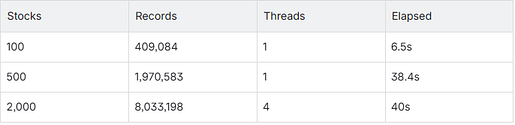
Note the 2,000-stock case uses 4 threads and finishes in roughly the same time as 500 stocks on 1 thread. The simulator parallelizes well.
For Tick-by-Tick Data (Full L2 Feed)
When using the order matching simulator, you need to send market data to the engine in a loop. Because tick-by-tick data can be extremely large, you may implement the integration in C++ to achieve higher performance.
Test Method
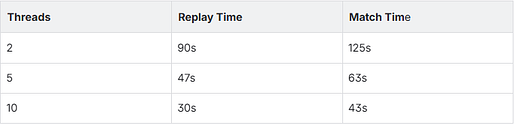
This test adopts a multi-threaded approach, where market data is distributed across threads based on the modulo of stock symbols. The overall test consists of two parts: market data replay and simulated order matching. We first use the replayDS and replay methods to read and replay market data from a DFS table, and then pass the replayed data to the algorithmic trading plugin.
Test Results
SZSE — 2,611 stocks, 130.3M records
SSE — 2,069 stocks, 84.1M records
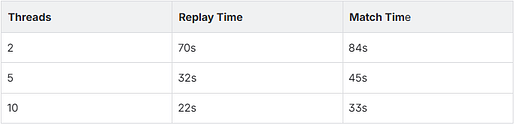
With 10 threads, a full trading day of tick-by-tick data across the entire SZSE universe completes in under 45 seconds — a turnaround that fits comfortably within a daily strategy development cycle. Scaling beyond 10 threads yields diminishing returns, as matching is compute-intensive and additional threads introduce scheduling overhead rather than parallel throughput.
Summary
The backtest-to-live gap in HFT is fundamentally a simulation fidelity problem. Queue position, latency, and partial fills are not edge cases — they are the default conditions under which every order operates, and their cumulative effect on a strategy trading at basis-point margins can be decisive.
The DolphinDB Order Matching Simulator addresses this by grounding backtests in exchange mechanics rather than abstractions. With L2 data as input — whether snapshot or tick-by-tick — it reconstructs the order book state at each point in time, places your orders into that book with the correct queue priority, and applies configurable latency and fill ratios to produce execution results that are materially closer to what a live system would observe. At scale, it processes tens of millions of records across thousands of stocks in under a minute, making it practical for daily iteration rather than occasional validation.
For strategies where execution quality is part of the alpha, the simulator provides both a more honest evaluation framework and a diagnostic tool: queue position metrics make it possible to identify not just whether a strategy underperforms, but where in the execution process the cost is being incurred.
Appendix
Complete Script File
C++ Source File