What’s Hidden in Exchange Tick Data? A Guide to Order Reconstruction
The same order-flow factor can produce different results across exchanges, even when the calculation logic is exactly the same. The issue may lie not in your factor, but in the underlying order data, as exchanges can report the same order events differently.
So, how can we make the data truly comparable? We’ll show how we use the Order Reconstitute Engine to reconstruct missing orders and provide a consistent data foundation.
Why Does Order Data Go Missing?
Take SSE and SZSE as an example. The key difference is how the two exchanges report immediately executed orders.
SZSE: Every order entering the matching system generates an order message, regardless of whether it is eventually executed.
SSE: Immediately executed orders are handled differently:
- Fully executed: Only the resulting trades are published; the original order is not separately reported.
- Partially executed: The trade is published first, followed by an order message containing only the remaining quantity.
For example, if a 2,000-share sell order has 531 shares executed immediately, the data shows a 531-share trade and a 1,469-share order—not the original 2,000-share order.
As a result, raw SSE data may undercount incoming orders, especially when measuring order arrivals rather than executions.
Order Reconstitute Engine: Restoring Missing Orders
To address this issue, DolphinDB provides the Order Reconstitute Engine, which reconstructs missing original orders in SSE tick data by linking order and trade messages through their order IDs.
It handles both cases:
- Fully executed: Reconstructs the original order by summing the volumes of the matched trades.
- Partially executed: Adds the executed volume to the remaining order quantity to recover the original order size, then restores the correct order of events.
The engine adds two fields: one flags reconstructed records, and the other preserves event order for downstream calculations.
One Interface for Both Historical Backtesting and Live Trading
The same reconstruction engine can be used in both historical research and real-time trading pipelines.
The workflow is straightforward:
Step 1: Prepare the Data
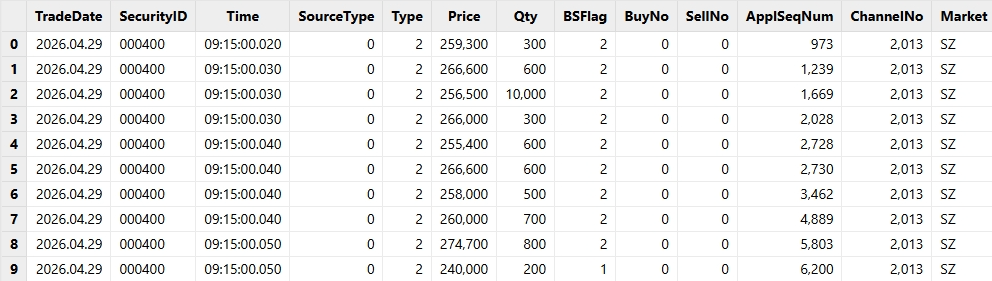
Merge tick-by-tick order and trade data into a unified table containing the security code, timestamp, price, quantity, side, order ID, and SourceType (0 for orders, 1 for trades).
Hint: Set BuyNo and SellNo to 0 for order records to keep the schema consistent.
For batch processing, merge the data directly with SQL. For streaming, there are two approaches:
- Merged stream: Subscribe directly to a merged stream table through plugins such as INSIGHT.
- Separate streams: Subscribe to order and trade streams separately, preprocess them in their handlers, and merge them into one stream table.
The resulting OrderTrans table:
Step 2: Create the Engine
DolphinDB exposes the reconstruction engine through createOrderReconstituteEngine.
The engine takes the normalized order/trade table as input and produces an output table containing the original fields plus orderMark and orderIndex.
engine = createOrderReconstituteEngine(
                    name="OrderReconstitute",
                    dummyTable=objByName(inputTbName),
                    outputTable=objByName(inputTbName+"OrderReconstitute"),
                    inputColMap=inputColMap)
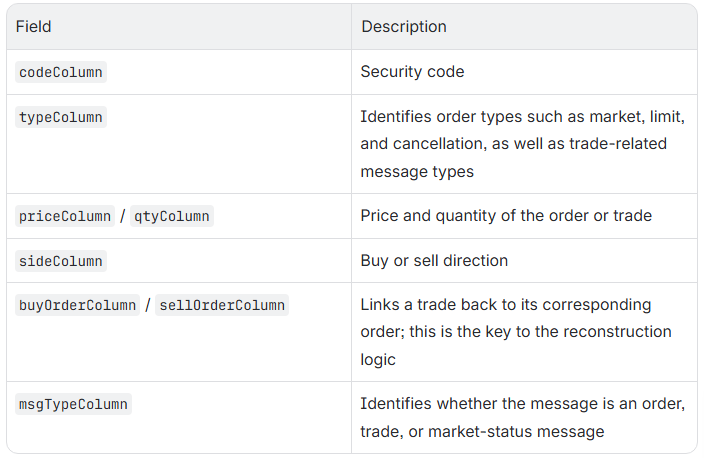
The inputColMap dictionary maps columns in your input table to the fields recognized by the engine:
tep 3: Feed Data into the Engine
Once the engine is created, simply feed it data to get the reconstructed results.
Note: The engine maintains order state by channel, so each instance can process only one trading day and one ChannelNo, with data fed in ApplSeqNum order.
For historical data, use append!:
// Select data for one day and one channel
testData = select * from SHOrderTrans
           where TradeDate=2026.04.29 and ChannelNo=1
           order by ApplSeqNum
// Feed the data into the reconstruction engine
getStreamEngine("OrderReconstitute").append!(testData)
For streaming data, pass the engine as the subscription handler:
subscribeTable(tableName="OrderTrans", actionName="orderTrans_to_reconstitute", offset=-1, handler=getStreamEngine("OrderReconstitute"), msgAsTable=true)Note: For multiple channels, split the input stream by ChannelNo or use a separate task for each channel.
Practical Applications
Case 1: Reconstructing Order Book Snapshots
In a typical high-frequency data pipeline, tick-by-tick orders and trades are standardized and used to reconstruct Orderbook snapshots for factor calculation and strategy backtesting.
Accurate event ordering is critical: missing or out-of-order orders can distort book quantities and order counts.
The reconstructed data can be directly fed into DolphinDB’s snapshot reconstruction engine. Use the generated orderIndex instead of the original order ID to preserve the correct event order.
inputColMap = dict(`codeColumn`timeColumn`typeColumn`priceColumn`qtyColumn
          `buyOrderColumn`sellOrderColumn`sideColumn`msgTypeColumn`seqColumn,
          `SecurityID`Time`Type`Price`Qty`BuyNo`SellNo`BSFlag`SourceType`orderIndex)
Case 2: Run the Same Order-Flow Factors Across SSE and SZSE
Order-flow factors measure order arrivals, not executions. Examples include:
- New buy/sell order count and volume over 60 seconds
- Buy/sell order-size volatility over five minutes
Raw SSE data may miss immediately executed orders, causing these factors to underestimate order arrivals.
The same factor logic can be used for both SSE and SZSE, with exchange-specific differences handled only through filtering:
- SZSE: New orders are identified by SourceType == 0.
- SSE: The reconstructed output includes new orders and other messages. To select new limit orders, use SourceType == 0 and Type == 2.
The factor logic is defined as follows:
/**
 * A26/A27:
 * Volatility of individual buy/sell order sizes over a 5-minute window
 */
def calcA26A27(orderTb, exchange){
    if(exchange == "SZ"){
        return select
            std(iif(BSFlag==1, Qty, NULL)) as A26,
            std(iif(BSFlag==2, Qty, NULL)) as A27
        from orderTb
        where SourceType == 0
        group by TradeDate, SecurityID, bar(Time, 5m) as Time
    } else if(exchange == "SH"){
        return select
            std(iif(BSFlag==1, Qty, NULL)) as A26,
            std(iif(BSFlag==2, Qty, NULL)) as A27
        from orderTb
        where SourceType == 0 and Type == 2
        group by TradeDate, SecurityID, bar(Time, 5m) as Time
    } else {
        throw "Unsupported exchange: " + exchange
    }
Once the individual factors are defined, they can be wrapped into a common calcMarketFactors function.
The exchange-specific workflow then becomes very simple:
// 1. SSE: use reconstructed tick-by-tick data
shOrderTb = select * from objByName("orderTrans2OrderReconstitute")
            order by orderIndex
// 2. SZSE: use the normalized tick-by-tick data directly
szOrderTb = select * from SZOrderTrans
            order by ApplSeqNum
// 3. Apply the same factor calculation function
shFactorRes = calcMarketFactors(shOrderTb, "SH")
szFactorRes = calcMarketFactors(szOrderTb, "SZ")
The key difference is now isolated to the data preparation layer:
- SSE uses the reconstructed orderTrans2OrderReconstitute table.
- SZSE uses the normalized SZOrderTrans table directly.
The resulting factor tables have the same schema and can be merged into a unified factor dataset.
Instead of maintaining two independent implementations for Shanghai and Shenzhen market data, the exchange-specific complexity is handled once during preprocessing.
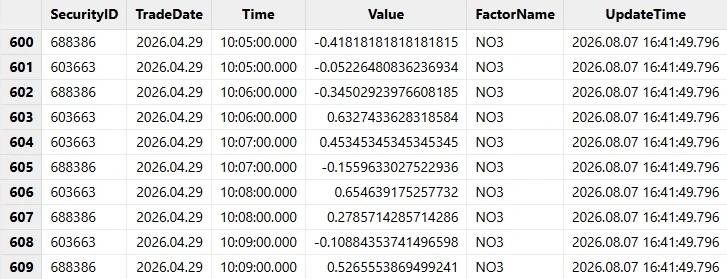
SSE Factor Calculation Results
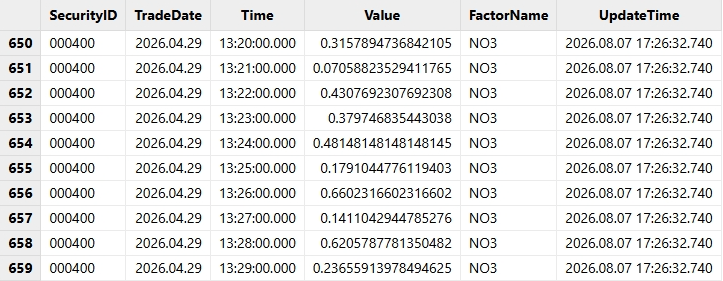
SZSE Factor Calculation Results
Conclusion
A small discrepancy in SSE tick data can lead to inconsistent results across SSE and SZSE, forcing developers to maintain exchange-specific workarounds.
The Order Reconstruction Engine solves this at the data layer, providing standardized data for downstream research and strategies.
This reflects DolphinDB’s approach: turn complex data processing into reusable engine capabilities, so researchers can focus on strategy development.
For the complete implementation, download the full practical code package.