Building a High-Frequency Price-Volume Strategy with DolphinDB's CEP Engine
High-frequency trading lives and dies by how fast you can turn a flood of real-time market data into a decision. Standard stream processing handles a single event type well, but the moment your logic depends on combinations of events — "cancel the order if no fill arrives within 60 seconds of a trade exceeding 50,000 shares" — the code tends to sprawl fast.
That's the gap Complex Event Processing (CEP) engine is built to close. This post walks through two progressively more realistic examples — from a bare-bones logging monitor to a working price-volume trading strategy — so you can see exactly how the pieces fit together.
The Building Blocks
Before diving into code, three concepts are worth knowing:
- Event — a snapshot of something happening in the market ("bought 1 share of AAPL at $170.85"), modeled as a class with named, typed attributes. Streams of events flow into the engine as rows in a stream table.
- Monitor — the container for your strategy logic. Every monitor implements an onload method, which fires once when the engine is created and typically kicks off one or more event listeners.
- Event Listener — registered via addEventListener, it matches events against a rule (a threshold, a sequence, a time window) and fires a callback when the rule is satisfied.
With that vocabulary in hand, let's build something.
Example 1: Logging Real-Time Quotes
The simplest possible use case: receive tick events and write them to the log.
Define the event
We first define a simple StockTick event containing a stock symbol and price:
// Represents a single stock tick
class StockTick{
    name :: STRING
    price :: FLOAT
    def StockTick(name_, price_){
        name = name_
        price = price_
    }
}
Define the monitor
The monitor's onload registers a listener that catches every StockTick event and hands it to processTick:
class SimpleShareSearch : CEPMonitor {
	newTick :: StockTick
	def SimpleShareSearch(){
		newTick = StockTick("init", 0.0)
	}
	def processTick(stockTickEvent)
	def onload() {
		addEventListener(handler=processTick, eventType="StockTick", times="all")
	}
	def processTick(stockTickEvent) {
		newTick = stockTickEvent
		str = "StockTick event received" +
			" name = " + newTick.name +
			" Price = " + newTick.price.string()
		writeLog(str)
	}
}
times="all" means the listener fires on every matching event; set times=1 if you only care about the first match.
Create the engine and feed it data
Once the CEP engine is created, StockTick events can be sent directly to it:
dummyTable = table(array(STRING, 0) as eventType, array(BLOB, 0) as eventBody)
try {dropStreamEngine(`simpleMonitor)} catch(ex) {}
createCEPEngine(name="simpleMonitor", monitors=<SimpleShareSearch()>,
dummyTable=dummyTable, eventSchema=[StockTick])

stockTick1 = StockTick('600001', 6.66)
getStreamEngine(`simpleMonitor).appendEvent(stockTick1)
stockTick2 = StockTick('300001', 1666.66)
getStreamEngine(`simpleMonitor).appendEvent(stockTick2)
Refresh the DolphinDB web console's log view and you'll see both ticks logged.
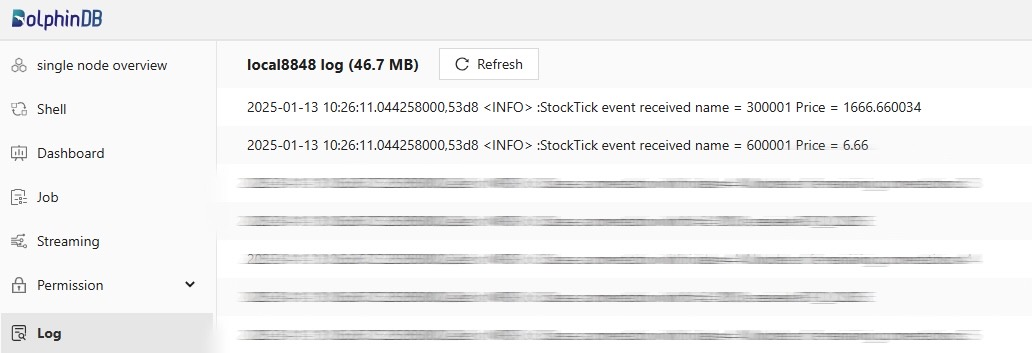
The pattern here — define the event → write a monitor with onload → create the engine → feed it data — is the same skeleton every CEP application follows, no matter how complex the logic gets. That's exactly what the next example builds on.
Example 2: A Real High-Frequency Price-Volume Strategy
Now for something closer to production: a strategy that places and cancels orders based on live price and volume signals.
Strategy logic
- For every tick, compute two real-time factors: ROC (price change relative to the lowest price in the last 15 seconds) and volume (cumulative traded volume over the last minute).
- When ROC > ROC0 and volume > volume0 (thresholds set per stock at initialization), fire an order.
- If the order isn't filled within 60 seconds, cancel it.
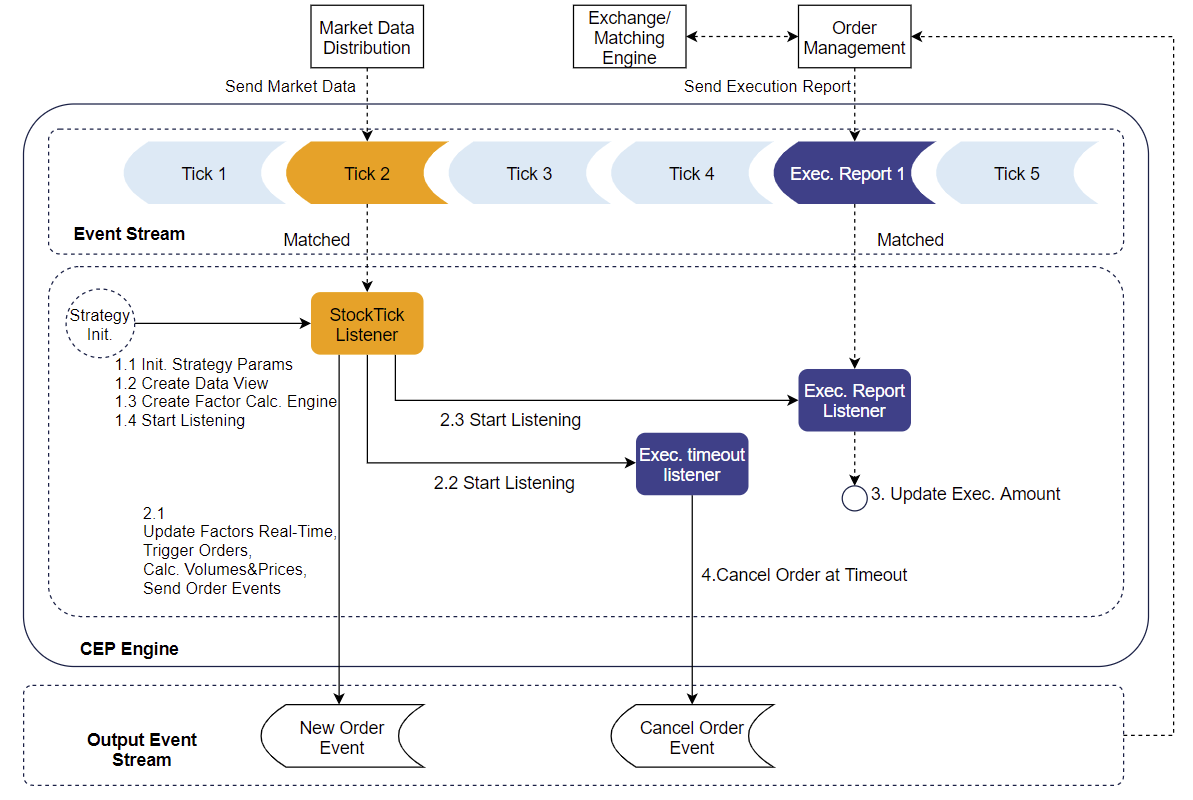
Compared to Example 1, this adds three new capabilities: a reactive state engine for incremental factor computation, emitEvent to push orders out to external systems, and a timeout timer to handle unfilled orders.
Define the events
Four event types are involved: ticks, execution reports, new orders, and cancellations.
class StockTick {
    securityid :: STRING
    time :: TIMESTAMP
    price :: DOUBLE
    volume :: INT
    def StockTick(securityid_, time_, price_, volume_) {
        securityid = securityid_
        time = time_
        price = price_
        volume = volume_
    }
}

class ExecutionReport {
    orderid :: STRING
    securityid :: STRING
    price :: DOUBLE
    volume :: INT
    def ExecutionReport(orderid_, securityid_, price_, volume_) {
        orderid = orderid_
        securityid = securityid_
        price = price_
        volume = volume_
    }
}

class NewOrder {
    orderid :: STRING
    securityid :: STRING
    price :: DOUBLE
    volume :: INT
    side :: INT
    type :: INT
    def NewOrder(orderid_, securityid_, price_, volume_, side_, type_) {
        orderid = orderid_
        securityid = securityid_
        price = price_
        volume = volume_
        side = side_
        type = type_
    }
}

class CancelOrder {
    orderid :: STRING
    def CancelOrder(orderid_) {
        orderid = orderid_
    }
}
Monitor skeleton
StrategyMonitor holds the whole strategy. Its onload initializes a monitoring dashboard (more on that below), spins up the factor-calculation engine, and starts listening for ticks:
class StrategyMonitor : CEPMonitor {
	strategyid :: INT
	strategyParams :: ANY
	dataview :: ANY
	def StrategyMonitor(strategyid_, strategyParams_) {
		strategyid = strategyid_
		strategyParams = strategyParams_
	}
	def execReportExceedTimeHandler(orderid, exceedTimeSecurityid)
	def execReportHandler(execReportEvent)
	def handleFactorCalOutput(factorResult)
	def tickHandler(tickEvent)
	def initDataView()
	def createFactorCalEngine()
	def onload(){
		initDataView()
		createFactorCalEngine()
		securityids = strategyParams.keys()
		addEventListener(handler=tickHandler, eventType="StockTick",
		condition=<StockTick.securityid in securityids>, times="all")
	}
}
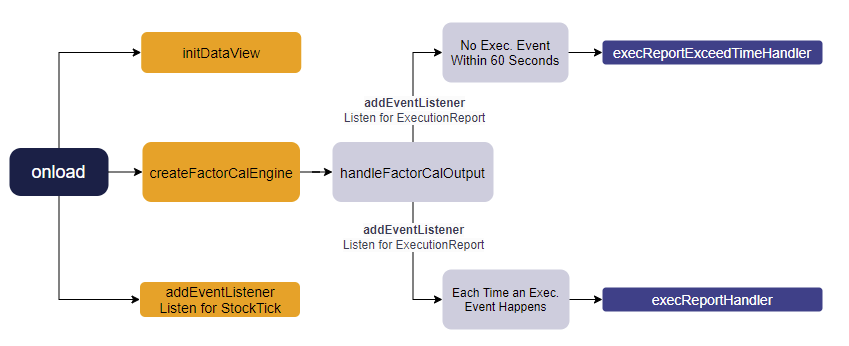
The call chain: tickHandler feeds each tick into the factor engine → factor results trigger handleFactorCalOutput → if thresholds are met, emitEvent places an order and two listeners go up (a fill listener and a timeout listener) → a fill or a timeout each route to their own handler.
Calculating factors with the reactive state engine
def createFactorCalEngine(){
    dummyTable = table(1:0, `securityid`time`price`volume,
    `STRING`TIMESTAMP`DOUBLE`INT)
    metrics = [<(price\tmmin(time, price, 15s)-1)*100>, <tmsum(time, volume, 60s)>, <price> ]
    factorResult = table(1:0, `securityid`ROC`volume`lastPrice,
    `STRING`INT`LONG`DOUBLE)
    createReactiveStateEngine(name="factorCal", metrics=metrics ,
    dummyTable=dummyTable, outputTable=factorResult, keyColumn=`securityid,
    outputHandler=handleFactorCalOutput, msgAsTable=true)
}
Rather than writing results straight to outputTable, this routes them through outputHandler=handleFactorCalOutput — the step that connects raw factor computation to actual trading decisions.
def handleFactorCalOutput(factorResult):
    factorSecurityid = factorResult.securityid[0]
    ROC = factorResult.ROC[0]
    volume = factorResult.volume[0]
    lastPrice = factorResult.lastPrice[0]
    updateDataViewItems(engine=self.dataview, keys=factorSecurityid,
    valueNames=["ROC","volume"], newValues=(ROC,volume))
    if (ROC > strategyParams[factorSecurityid][`ROCThreshold]
    and volume > strategyParams[factorSecurityid][`volumeThreshold]):
        orderid = self.strategyid+"_"+factorSecurityid+"_"+long(now())
        newOrder = NewOrder(orderid, factorSecurityid, lastPrice*0.98, 100, 'B', 0)
        emitEvent(newOrder) // push the order out to external systems
        newOrderNum = (exec newOrderNum from self.dataview where
        securityid=factorSecurityid)[0] + 1
        newOrderAmount = (exec newOrderAmount from self.dataview where
        securityid=factorSecurityid)[0] + lastPrice*0.98*10
        updateDataViewItems(engine=self.dataview, keys=factorSecurityid,
        valueNames=["newOrderNum", "newOrderAmount"],
        newValues=(newOrderNum, newOrderAmount))
        addEventListener(handler=self.execReportExceedTimeHandler{orderid,
        factorSecurityid}, eventType="ExecutionReport",
        condition=<ExecutionReport.orderid=orderid>, times=1, exceedTime=60s)
        addEventListener(handler=execReportHandler, eventType="ExecutionReport",
        condition=<ExecutionReport.orderid=orderid>, times="all")
    }
}
Placing and cancelling orders
def execReportExceedTimeHandler(orderid, exceedTimeSecurityid):
    emitEvent(CancelOrder(orderid)) // no fill in time, cancel
    timeoutOrderNum = (exec timeoutOrderNum from self.dataview
    where securityid=exceedTimeSecurityid)[0] + 1
    updateDataViewItems(engine=self.dataview, keys=exceedTimeSecurityid,
    valueNames=`timeoutOrderNum, newValues=timeoutOrderNum)
}

def execReportHandler(execReportEvent):
    executionAmount = (exec executionAmount from self.dataview
    where securityid=execReportEvent.securityid)[0] +
    execReportEvent.price*execReportEvent.volume
    executionOrderNum = (exec executionOrderNum from self.dataview
    where securityid=execReportEvent.securityid)[0] + 1
    updateDataViewItems(engine=self.dataview, keys=execReportEvent.securityid,
    valueNames=["executionAmount","executionOrderNum"],
    newValues=(executionAmount,executionOrderNum))
}

def tickHandler(tickEvent){
	factorCalEngine = getStreamEngine(`factorCal)
	insert into factorCalEngine values([tickEvent.securityid,
	tickEvent.time, tickEvent.price, tickEvent.volume])
}
The detail worth pausing on is times=1, exceedTime=60s inside addEventListener. That single combination gives you "cancel if unfilled after 60 seconds" as a built-in timer, with no manual polling loop required.
Wiring up the engine end to end
dummy = table(array(STRING, 0) as eventType, array(BLOB, 0) as eventBody)
share(streamTable(array(STRING, 0) as eventType, array(BLOB, 0) as eventBody,
array(STRING, 0) as orderid), "output")
outputSerializer = streamEventSerializer(name=`serOutput,
eventSchema=[NewOrder,CancelOrder], outputTable=objByName("output"),
commonField="orderid")
strategyid = 1
strategyParams = dict(`300001`300002`300003,
[dict(`ROCThreshold`volumeThreshold, [1,1000]),
dict(`ROCThreshold`volumeThreshold, [1,2000]),
dict(`ROCThreshold`volumeThreshold, [2, 5000])])
engine = createCEPEngine(name='strategyDemo', monitors=<StrategyMonitor(strategyid,
strategyParams)>, dummyTable=dummy, eventSchema=[StockTick,ExecutionReport],
outputTable=outputSerializer)
Because the strategy calls emitEvent, the engine's outputTable can't be a plain table — it has to be an event serializer created with streamEventSerializer. It serializes heterogeneous events like NewOrder and CancelOrder into BLOBs and writes them to the shared stream table output, ready for downstream subscribers.
Simulating data and checking the result
ids = `300001`300002`300003`600100`600800
for (i in 1..120) {
    sleep(500)
    tick = StockTick(rand(ids, 1)[0], now()+1000*i,
10.0+rand(1.0,1)[0], 100*rand(1..10, 1)[0])
    getStreamEngine(`strategyDemo).appendEvent(tick)
}

sleep(1000*20)
print("begin to append ExecutionReport")
for (orderid in (exec orderid from output where eventType="NewOrder")){
    sleep(250)
    if(not orderid in (exec orderid from output where eventType="CancelOrder")) {
        execRep = ExecutionReport(orderid, split(orderid,"_")[1], 10, 100)
        getStreamEngine(`strategyDemo).appendEvent(execRep)
    }
}
The loop generates 120 random ticks to trigger orders, then deliberately sleeps 20 seconds to simulate unfilled orders before backfilling execution reports. That way a single run exercises both branches of the logic — normal fills and timeout cancellations — and you can inspect the eventType, eventBody, and orderid columns of the output table to confirm both paths worked.
Watching the Strategy in Real Time
Log lines aren't enough for a live strategy — you want a dashboard showing current ROC, open order count, and fill rate at a glance. DolphinDB's data view engine is built for exactly that: it keeps only the latest snapshot per key (securityid here), not a history, which makes it a lightweight fit for live monitoring.
Initialization happens in onload:
def initDataView(){
    share(streamTable(1:0, `securityid`strategyid`ROCThreshold
`volumeThreshold`ROC`volume`newOrderNum`newOrderAmount`executionOrderNum
`executionAmount`timeoutOrderNum`updateTime,
`STRING`INT`INT`INT`INT`INT`INT`DOUBLE`INT`DOUBLE`INT`TIMESTAMP), "strategyDV")
    dataview = createDataViewEngine(name="Strategy_"+strategyid,
outputTable=objByName(`strategyDV), keyColumns=`securityId, timeColumn=`updateTime)
    num = strategyParams.size()
    securityids = strategyParams.keys()
    ROCThresholds = each(find{,"ROCThreshold"}, strategyParams.values())
    volumeThresholds = each(find{,"volumeThreshold"}, strategyParams.values())
    dataview.tableInsert(table(securityids, take(self.strategyid, num) as
strategyid, ROCThresholds, volumeThresholds, take(int(NULL), num) as ROC,
take(int(NULL), num) as volume, take(0, num) as newOrderNum,
take(0, num) as newOrderAmount, take(0, num) as executionOrderNum,
take(0, num) as executionAmount, take(0, num) as timeoutOrderNum))
}
From there, every state change in the strategy — a fresh factor value, a fill, a timeout — flows through the same updateDataViewItems(engine=self.dataview, keys=..., valueNames=..., newValues=...) call you saw earlier in handleFactorCalOutput, execReportHandler, and execReportExceedTimeHandler. The result is a live view in the DolphinDB web console showing each stock's current factor values, open orders, fill amounts, and timeout counts — updated as events happen, not on a delay.
Wrapping Up
The code grows from Example 1 to Example 2, but the skeleton never changes: define events → write a monitor with onload → create the engine → feed it data and verify. What Example 2 adds — incremental factor computation via the reactive state engine, pushing events out with emitEvent, and timeout-driven order control via exceedTime — covers most of what a real high-frequency strategy needs: compute a signal, act on it, and manage the risk of an unfilled order. That combination is a solid starting point for building your own.