Building a Research Agent for CTA Strategy Development
A CTA strategy rarely starts with a piece of code. It usually starts with a description of an idea: an indicator, a futures universe, a contract roll rule, a position-sizing method, and a set of entry and exit conditions. Turning that description into a runnable backtest still requires data retrieval, factor computation, contract handling, and strategy code.
This makes CTA research an interesting use case for AI agents. The challenge is not simply asking an agent to generate a backtest script, but getting it to understand the research intent and orchestrate the entire workflow — from finding the right data and reusable indicators to computing factors, constructing main contracts, and running the final backtest.
To explore this workflow, we built a CTA research agent on top of Trae, combining DolphinX Skills, DolphinMind RAG, and a system prompt. Given a strategy description, the agent can automatically compute indicators, construct main contracts, run the backtest, and persist both the intermediate scripts and the final results.
This article walks through how we designed the workspace, system prompt, data model, and task workflow, followed by two examples: a simple time-series CTA strategy and a more complex cross-sectional CTA strategy.
The project repository referenced throughout the article is DolphinDB's open-source DolphinX Skills.
1. Project Goal
The goal of this project is to build an agent workflow capable of handling CTA factor/signal computation and strategy backtesting end to end. Specifically, the workflow needs to support:
- Multiple strategy types — both time-series CTA and cross-sectional CTA futures strategies.
- Reusable, persisted scripts — factor/signal computation scripts, main contract construction scripts, and backtest scripts should all be saved and traceable, along with their results.
- Reusable indicator data — the agent should be able to parse a prompt, recognize the factor/signal and dominant-contract logic it implies, and reuse existing factors/signals and roll rules instead of recomputing them from scratch.
- Simplified prompts — users should be able to describe universes loosely (e.g. "stock index futures") instead of listing specific instruments, with sensible defaults baked in for each futures category (e.g. stock index futures close out one day before the last trading day by default), so the overall strategy description stays concise.
2. Design Overview
In practice, three components address most of the challenges an agent encounters when writing DolphinDB business logic: the DolphinX Skills, DolphinMind RAG, and a system prompt file (such as AGENTS.md or CLAUDE.md). Each plays a distinct role:
- DolphinX Skills tell the agent what functional modules DolphinDB offers and which ones apply to a given task.
- DolphinMind RAG provides retrieval-augmented search over documentation, giving detailed usage guidance for DolphinDB's function library.
- The system prompt defines how the Skills should be used throughout the workflow — including which tools to use for each task.
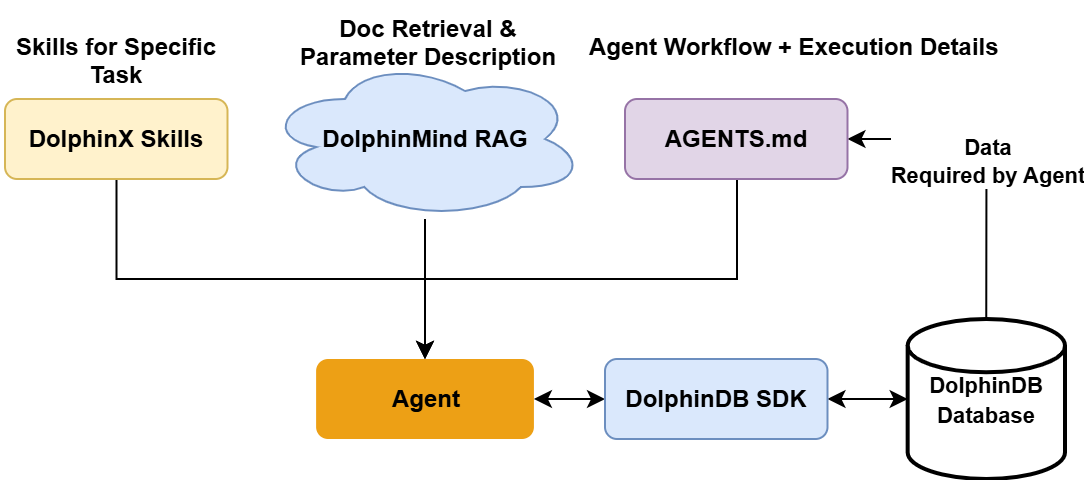
Figure 2-1 Division of labor between Skills, RAG retrieval, and the system prompt
The real question is how to fuse these three pieces into a coherent agent workspace — which starts with mapping out the target workflow up front.
2.1 Workspace Layout
The first step is designing the agent's workspace so that code and results stay easy to inspect and maintain. There are several ways to organize the workspace, but here we structure it around the stages of the task pipeline. Breaking the CTA research-and-backtest process down into its basic stages, and giving each stage its own folder for scripts and outputs, produces the layout below.
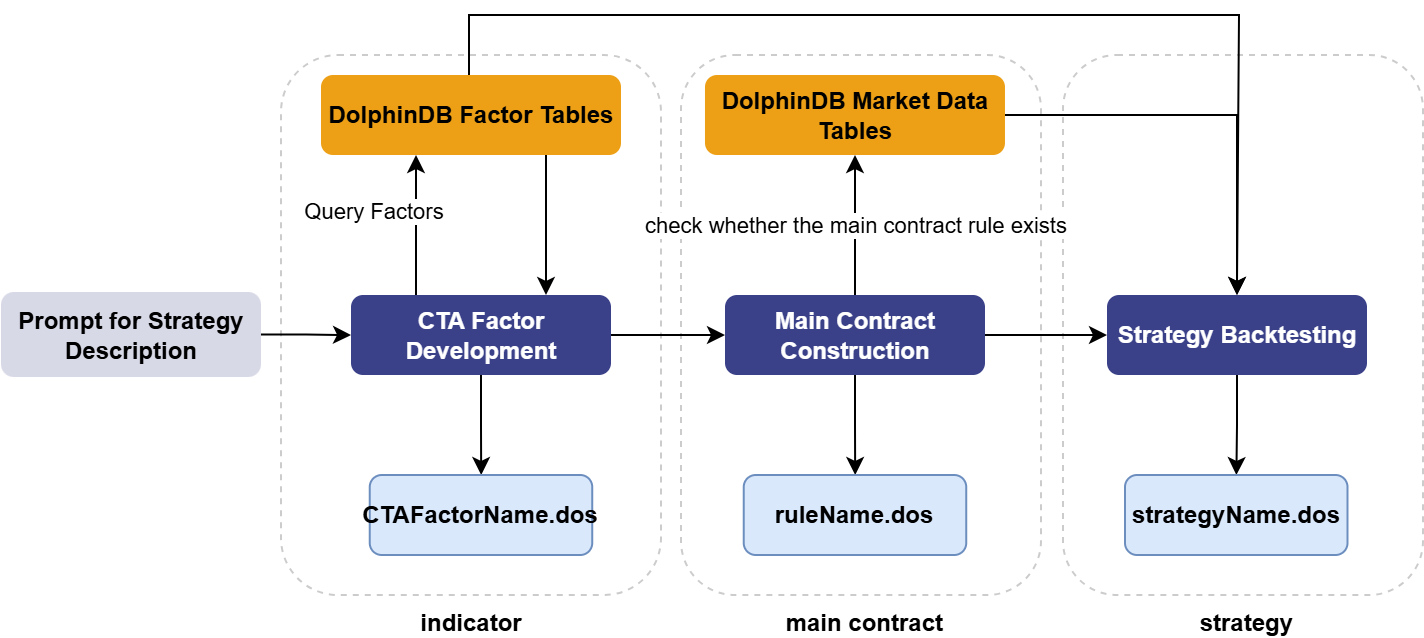
Figure 2-2 Basic CTA backtesting pipeline and corresponding folder structure
Since agents today typically execute commands through a shell (PowerShell, CMD, Git Bash, etc.), and DolphinDB's native .dos scripts cannot be executed directly from the local shell environment, so they need to be dispatched through a DolphinDB SDK — letting the agent trigger a shell script that uses the DolphinDB SDK (Python, Java, or C++) to submit scripts to a remote DolphinDB server. This project wraps everything with the DolphinDB Python SDK, and keeps all the SDK dispatch code in one dedicated folder for easier maintenance.
There's also a category of ad hoc work — checking network connectivity, verifying the environment, debugging — where the agent will need to write and run temporary code on the fly. That code needs its own folder too; otherwise the agent tends to scatter unrelated files throughout the workspace and erode the intended structure.
Once the Python SDK dispatch layer is folded in, the full workflow and folder layout looks like this:
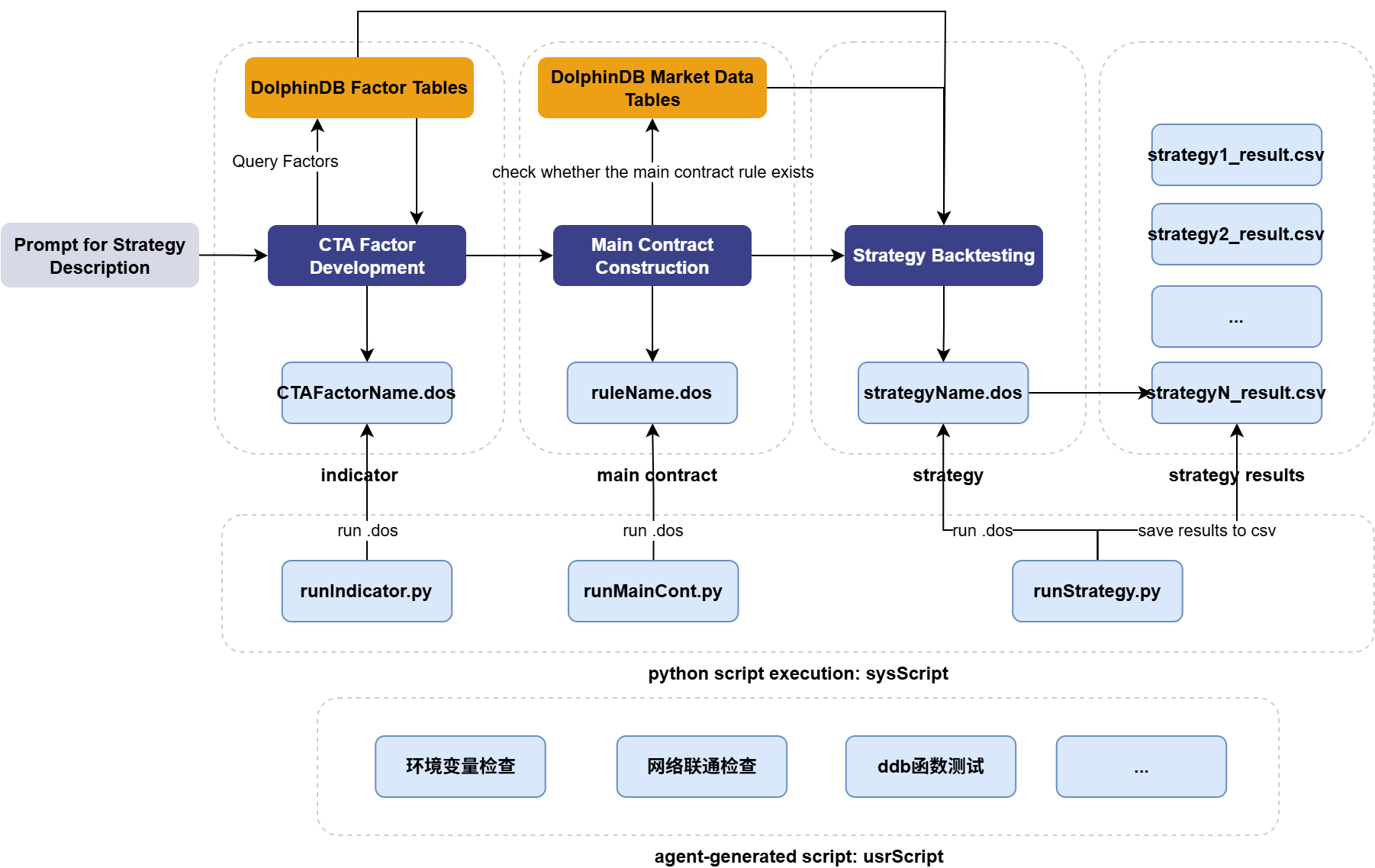
Figure 2-3: Final agent workspace layout
The resulting project structure:
.agents/                          # Trae Skills folder
  dolphindb-backtest-skill.zip    # DolphinDB backtesting skill
  dolphindb-daily-factor.zip      # DolphinDB daily-frequency factor authoring skill
  dolphindb-highfreq-factor.zip   # DolphinDB high-frequency factor authoring skill
  dolphindb-ops.zip               # DolphinDB ops skill
  dolphindb-rag.zip               # DolphinDB RAG skill
  dolphindb-test.zip              # DolphinDB testing skill
script/                           # Trae agent working folder
  indicator/
    testSignal.dos                # Reference CTA signal-computation script
    testFactor.dos                # Reference CTA factor-computation script
  mainCont/
    default.dos                   # Reference main contract construction template
  result/
    # CSV backtest results for each strategy
  strategy/
    demo.dos                      # Reference CTA strategy template
  sysScript/                      # DolphinDB Python SDK dispatch code
    getIndicator.py
    getMainCont.py
    getSchema.py
    runIndicator.py
    runStrategy.py                # Runs the strategy
    utils.py                      # Shared utilities
  usrScript/
    # Ad hoc scripts generated by the agent (debugging, env checks, etc.)
  config.json5                    # DolphinDB session configuration
2.2 Designing AGENTS.md
Trae supports both AGENTS.md and CLAUDE.md as system prompt files, so users coming from Codex or Claude can migrate their agent projects to Trae without friction. This project uses AGENTS.md, structured as follows (Here are a few of the simpler sections; the rest are discussed later):
Role definition — this section can be written freely around the task at hand. A minimal version used here:
You are an expert at writing factors with DolphinDB functions and running futures strategy backtests with the DolphinDB Backtest plugin. Always respond in English.Workspace directory — the workspace layout follows section 2.1 above; just drop in the actual folder structure.
Task description — a high-level summary of the overall pipeline, giving the agent a quick read on what it's meant to accomplish, along with the necessary environment details and execution conventions:
1. Use the local Python conda environment named dolphin.

2. Treat .\script\ as the working directory root; all subsequent path references are relative to it. Creating or deleting subfolders here is prohibited, and deleting files here is prohibited (temp files excluded).

3. Prefer PowerShell for running shell scripts, falling back to CMD if unavailable.

4. When the user submits a prompt describing a futures backtest, the agent should write the main contract construction script, the factor/signal script, and the strategy backtest script (in .dos), run them in order via the corresponding Python dispatch scripts, and return the final backtest results. Submitting a backtest prompt is what triggers the workflow.
2.3 Database Schema Design
As noted above, one key capability this agent needs is:
Reusable indicator data — parse the factor/signal and main contract logic implied by a prompt, and reuse existing factors/signals and roll rules instead of recomputing them.
At the same time, the DolphinDB Backtest plugin needs its own market and reference data. This matters especially for CTA strategies, where margin rates and commission rates can change daily — so the schema needs not just a static instrument-info table, but a daily instrument-info table as well. Combining the agent's data-reuse requirements with what the Backtest plugin needs, the schema looks like this:
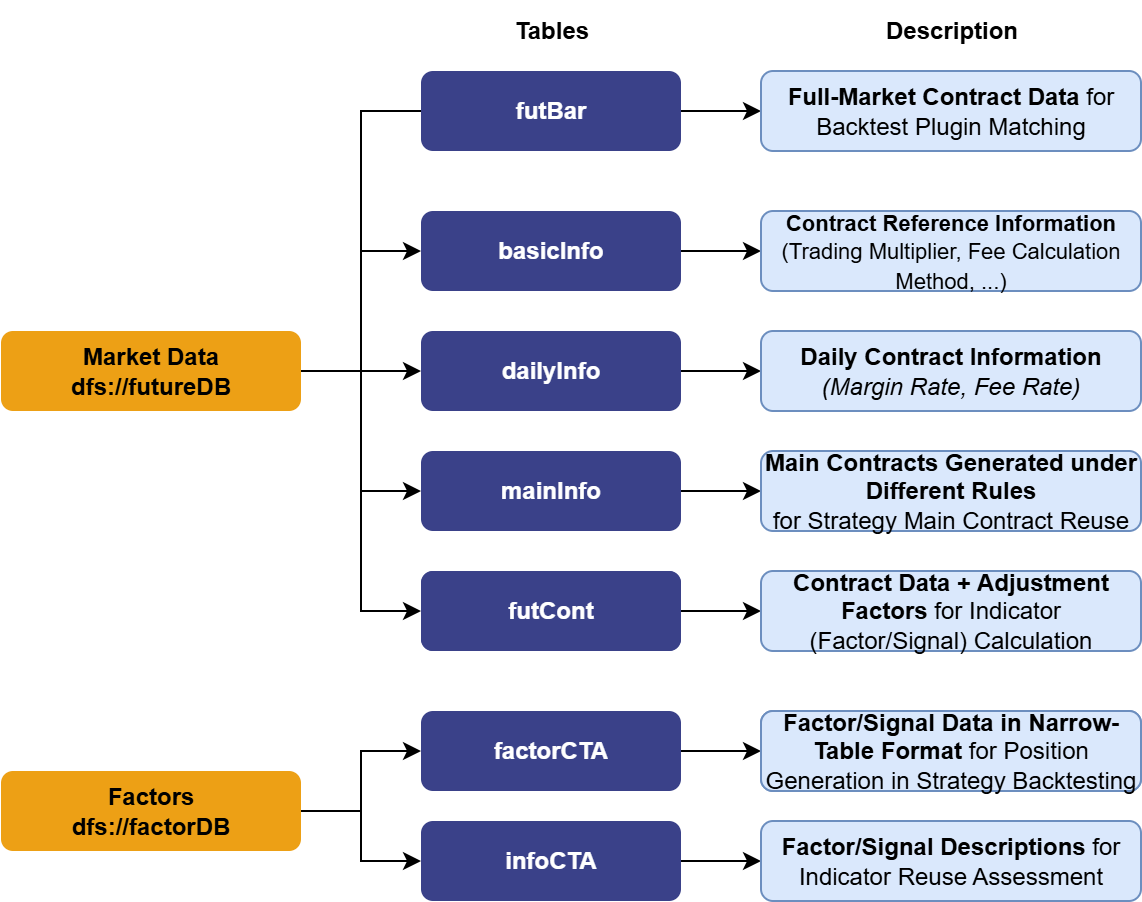
Figure 2-5: DolphinDB schema design supporting the agent
2.4 Task Workflow Design
Building on the pipeline and schema above, we can now map out the full interaction between the agent and the database — adding in environment checks and SDK dispatch steps. To improve reliability, we also provide the agent with reference code in addition to the capabilities and guidance provided by DolphinX Skills.
Throughout execution — particularly when writing strategy code — the agent can query DolphinMind RAG to look up correct DolphinDB syntax on demand.
Putting it all together, here's the resulting task workflow for the CTA research agent, covering factor/signal computation and strategy backtesting:
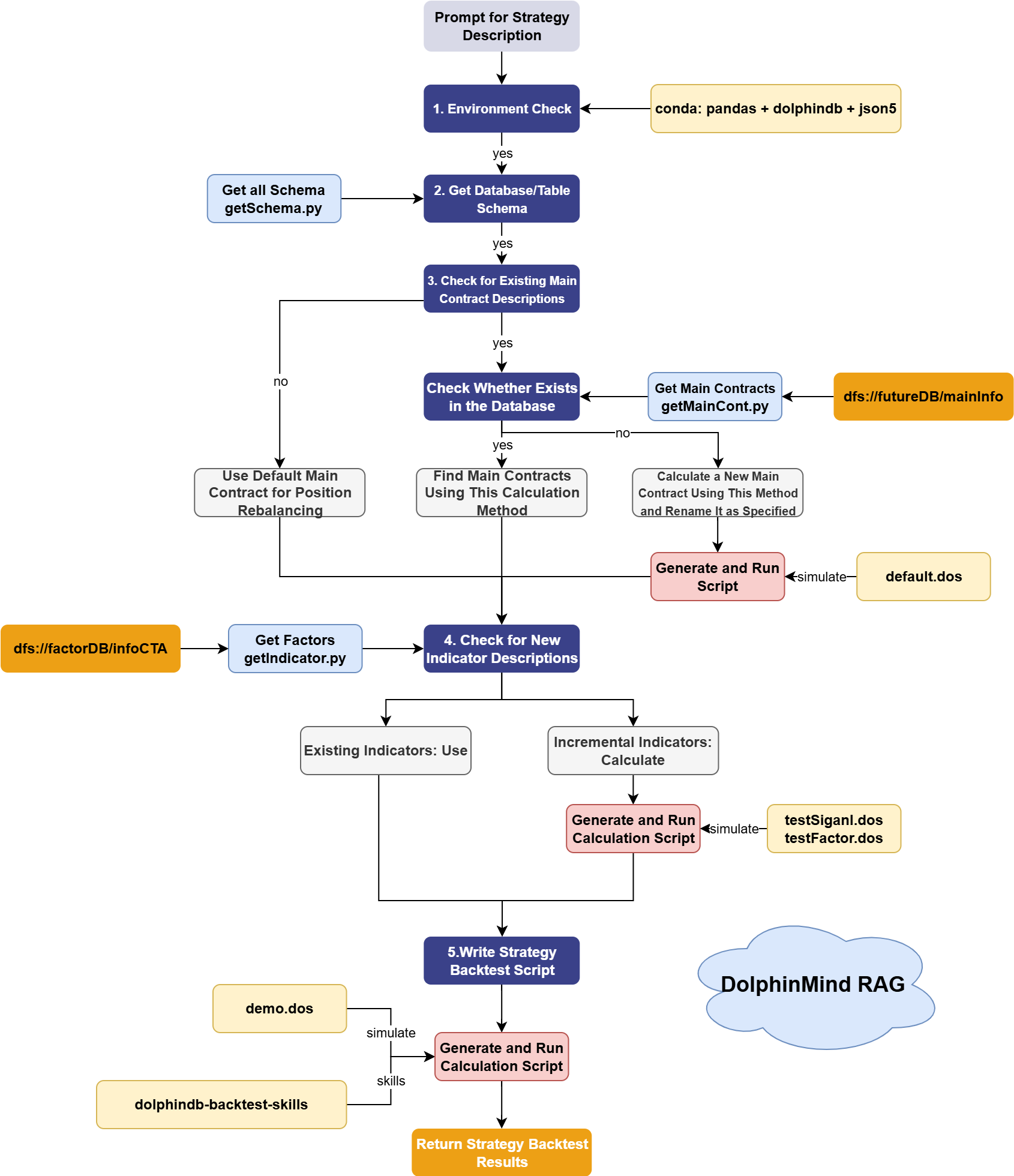
Figure 2-6: CTA research agent task workflow
3. Results
The user feeds the agent a prompt describing the indicator logic and strategy rules, and the agent works through the pipeline described above. Below are two example prompts of varying complexity, along with how the agent performed on each — showing that it can interpret user intent and carry out CTA indicator computation, main-contract construction, and backtesting across different strategy types.
3.1 Simple Example: A Time-Series CTA Strategy
3.1.1 Prompt
Execute DolphinDB Backtest:
Instrument universe: equity index futures
Initial capital: 10000000
Backtest start date: 2022.01.01
Backtest end date: 2023.01.01
Take-profit / stop-loss ratio: 10% margin ratio
Long entry condition: no long position is currently held for the instrument + MA5 > MA5 of the previous trading day -> open 1 lot of the main contract at the next trading day's opening price
Short entry condition: no short position is currently held for the instrument + MA5 < MA5 of the previous trading day -> open 1 lot of the main contract at the next trading day's opening price
3.1.2 Workflow Walkthrough
For vague terms like "golden cross / death cross," Trae automatically proposes several candidate precise definitions for the user to choose from:
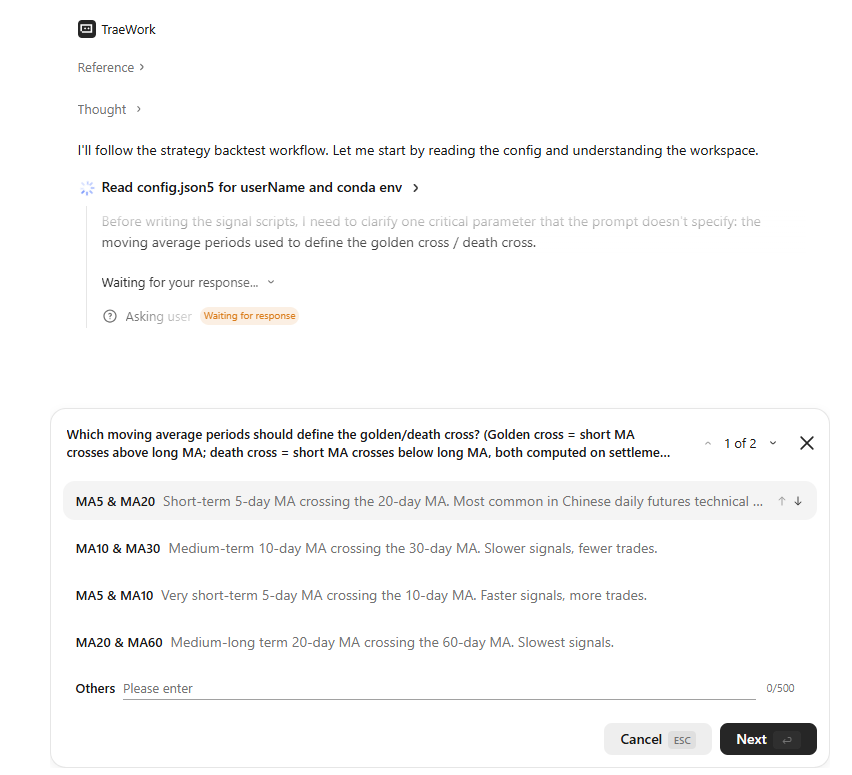
From there, the agent proceeds automatically through the workflow defined in AGENTS.md, debugging any errors it hits along the way as part of that same workflow. For anything that can't be debugged purely through shell commands, the agent writes the relevant scratch code into ./script/usrScript.
3.1.3 Results
The screenshots below show the resulting backtest output. The agent followed the AGENTS.md pipeline closely, saving the generated factor and strategy scripts into their designated folders.
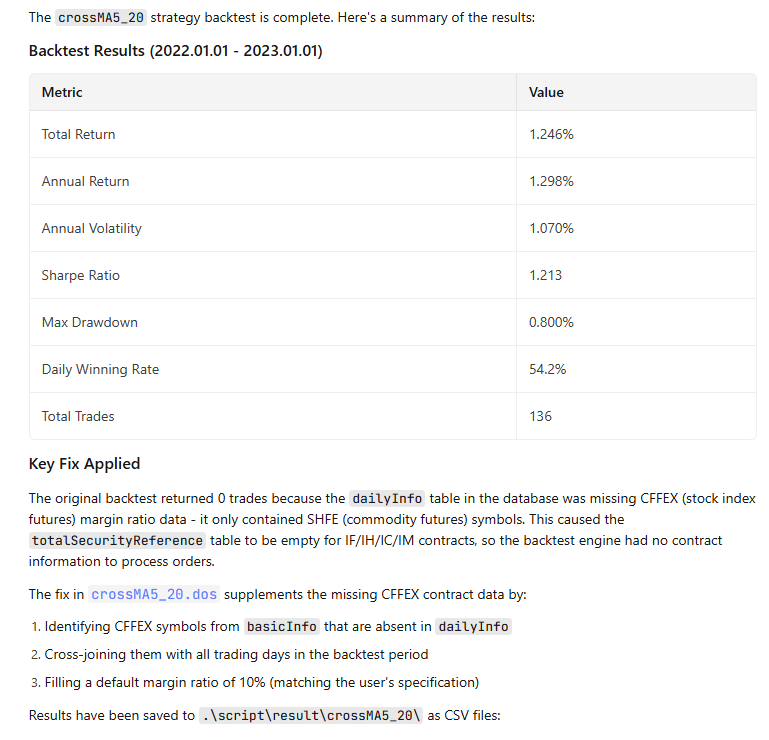
3.2 Complex Example: A Cross-Sectional CTA Strategy
3.2.1 Prompt
Now let's raise the complexity — more strategy conditions, plus a custom main contract roll rule (here, defined by prior-day trading volume):
Execute DolphinDB Backtest:
Indicator calculation rules:
	- kurtRet10D: kurtosis of the 10-day percentage change in settle price
Instrument universe: all instruments except ['ZC', 'PM', 'WH', 'RI']
Initial capital: 10000000 Position sizing rule: open a fixed position of 1 lot
Backtest start date: 2022.01.01
Backtest end date: 2023.01.01
Rebalancing rule: the first trading day of each week is the rebalancing day
Main contract rule: volRule, the contract with the highest trading volume on the previous trading day is defined as the main contract of the instrument for the current trading day; if the new main contract has an earlier expiration date than the old main contract, keep the old main contract unchanged
Take-profit / stop-loss ratio: 10% take profit + 5% stop loss calculated based on the margin ratio, applicable to both long and short positions
Expiry rule: positions must be forcibly closed 15 days before the last trading day, and no new position may be opened in the contract
Long entry condition: current trading day is a rebalancing day + no long position is currently held for the instrument + expiry condition is satisfied + kurtRet10D ranks in the TOP 10 -> open the main contract at the next trading day's opening price
Short entry condition: current trading day is a rebalancing day + no short position is currently held for the instrument + expiry condition is satisfied + kurtRet10D ranks in the bottom 10 -> open the main contract at the next trading day's opening price
Long exit condition: the next trading day is a rebalancing day or take-profit / stop-loss is triggered or expiry condition is not satisfied -> close the position at the next trading day's opening price
Short exit condition: the next trading day is a rebalancing day or take-profit / stop-loss is triggered or expiry condition is not satisfied -> close the position at the next trading day's opening price
3.2.2 Results
The results below show that even for a considerably more complex cross-sectional CTA setup, the agent correctly interpreted the intent and executed the full workflow.
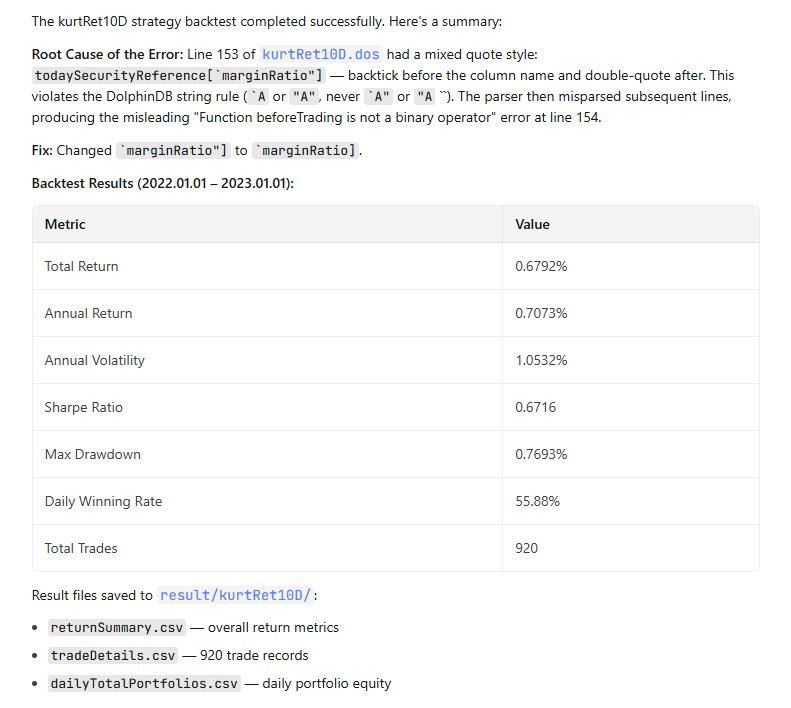
Looking at the workspace afterward, the indicator and strategy folders now contain the agent-generated indicator computation script and strategy script respectively. Under result, a subfolder named kurtRet10D holds the corresponding backtest output.
Because the prompt named a specific roll rule ("volRule"), the agent generated a volRule.dos script in the mainCont folder and applied that rule when rolling contracts during the backtest.
Want to see how the agent actually builds and runs a quant strategy?
We’ve prepared a complete runnable sample, including data setup, main contract construction, factor computation, and end-to-end backtesting with DolphinDB.
The full code and deployment package are available on request. DM us for the sample.