In quantitative trading, real-time risk management and market microstructure analysis, everything downstream depends on one thing: market data that arrives fast and arrives reliably.
DolphinDB has long supported market data access through XTP. Now that the XTP market data interface has been upgraded to XTP-Pro, we've completed the integration and released the XTPPro plugin, so you can keep your familiar workflow while tapping into the enhanced data service.
The XTPPro plugin is available now on the DolphinDB Plugin Market. It delivers real-time data from the Shanghai Stock Exchange (SSE), Shenzhen Stock Exchange (SZSE) and Beijing Stock Exchange (BSE), including snapshots, tick-by-tick transactions and order book data. Incoming data is written directly into DolphinDB shared tables, ready for real-time processing, storage and analysis.
Broad Coverage Across Markets and Securities
The XTPPro plugin supports market data access from the SSE, SZSE, and BSE, covering a range of securities, including stocks, funds, bonds, options, and indices.
The supported market data types are summarized below:
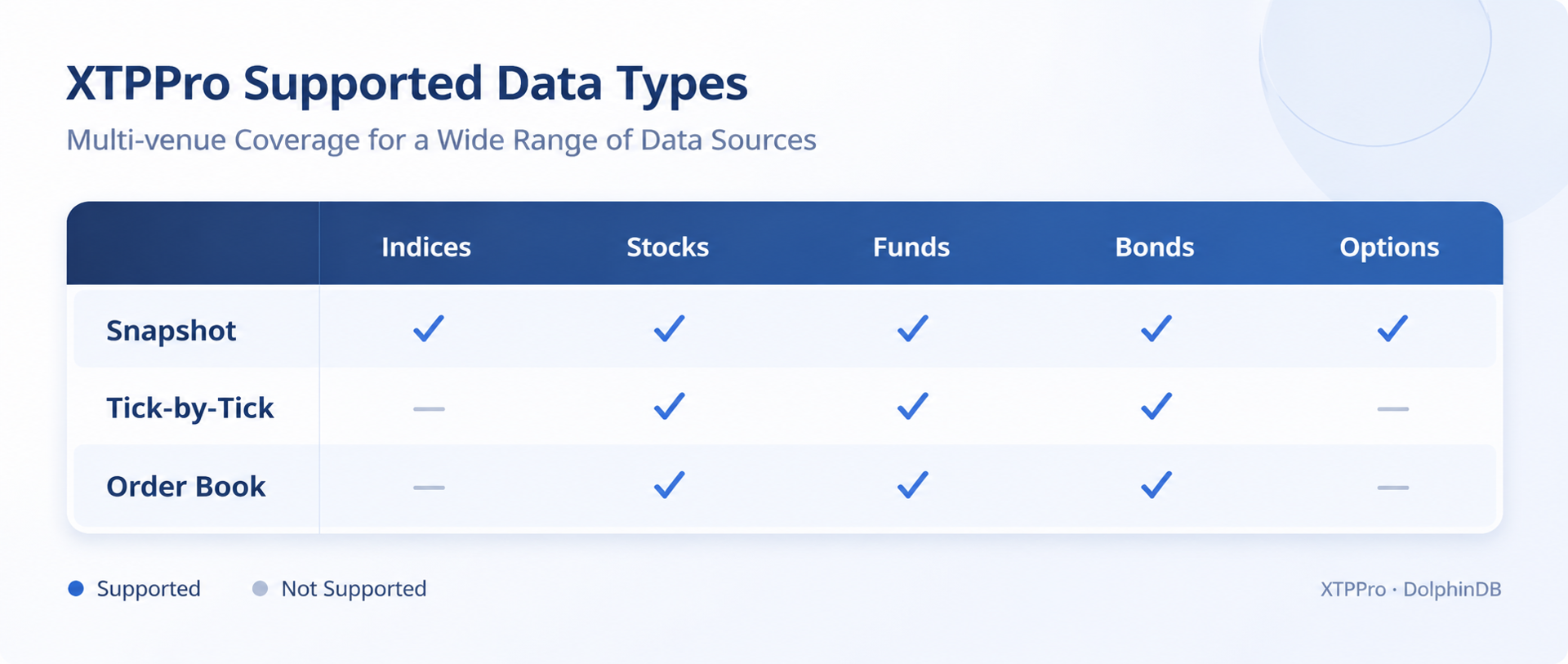
Note: For the BSE and National Equities Exchange and Quotations (NEEQ) (marketType=3), only snapshot data is supported, and data can only be received via UDP.
Key Features: Built for Market Data Access and Real-Time Analytics
Multi-market subscriptions, tailored to your needs
Subscribe across the SSE, SZSE and BSE. Choose the markets, security codes and data types you need, and control your subscription scope with precision.
TCP and UDP, your choice
Both protocols are supported. Pick the one that best fits your market data service configuration, network environment and business requirements.
Direct data ingestion into DolphinDB
Market data lands directly in DolphinDB shared tables and flows into your downstream workflows: real-time computation, time-series storage and historical analysis. That means fewer cross-system transfers and less format-conversion overhead.
Connection monitoring and automatic reconnection
Heartbeat detection and automatic reconnection help keep your connection stable. After a successful TCP reconnection, your existing subscriptions are restored automatically. For UDP, the plugin resumes receiving multicast data once the connection is back.
Note: Automatic reconnection does not recover market data missed while the connection was down.
Receive timestamps and processing-latency monitoring
The plugin records when each message is received and how long it takes to process. Use these metrics to monitor connection health and measure the efficiency of your ingestion pipeline.
Quick Start: Subscribe to Market Data in Three Steps
Requirements
- DolphinDB Server 2.00.19, 3.00.6 or later
- Linux x64
- The XTP-Pro SDK shared library
libxtpxquoteapi.so, provided by the data vendor - A valid market data account with the required subscription permissions
You can install and load the plugin with DolphinDB's built-in plugin management functions.
Step 1: Find and Install the Plugin
listRemotePlugins()
installPlugin("XTPPro")
Step 2: Load the Plugin
loadPlugin("XTPPro")Step 3: Connect and subscribe
The example below subscribes to SSE stock snapshot data over TCP.
// Set global configuration
XTPPro::setGlobalConfig(
    clientId=1,
    saveFilePath="/path/to/log"
)

// Create a market data connection
conn = XTPPro::createXTPConnection(name="xtpProFeed")

// Retrieve the schema and create a shared stream table
schema = XTPPro::getSchema(type="actualMarketData")
quoteTable = streamTable(10000:0, schema.name, schema.typeString)
share(table=quoteTable, sharedName="xtpProActual")

// Configure login credentials
config = dict(keyType=STRING, valueType=ANY)
config["ip"] = "Market Data Server IP"
config["port"] = 12345
config["user"] = "Username"
config["password"] = "Password"
config["protocolType"] = 1  // 1: TCP, 2: UDP

// Log in to the market data server
XTPPro::login(conn=conn, config=config)

// Configure the output table and subscribe to market data
tableDict = dict(keyType=STRING, valueType=ANY)
tableDict["actualTable"] = quoteTable

XTPPro::subscribe(
    conn=conn,
    quoteType=1,       // 1: Snapshot
    marketType=1,      // 1: SSE
    codeList=["600000", "600519"],
    tableDict=tableDict
)

// Check subscription status
XTPPro::getStatus(conn=conn)
Once the subscription is established, incoming market data will be continuously written to the DolphinDB shared stream table, ready for real-time computation and analysis.
This example covers a basic subscription workflow. For additional market data types and detailed API parameters, please refer to the official technical documentation.
An Open Ecosystem: Building the DolphinDB Plugin Community Together
Plugins are the bridge between DolphinDB and external data sources, business systems and third-party technologies, and a cornerstone of our open ecosystem.
With XTPPro, DolphinDB's financial market data integration grows further. The Plugin Market lets you pick up ready-made plugins and cut down on integration work and custom development. And if your team has built something that works, you can package it as a plugin and share it with the community.
The Plugin Market is open to developers, enterprise users and ecosystem partners. We'd love for you to join in, whether through plugin development, technical knowledge-sharing or new applications, and help us grow the ecosystem together.
Ready to try it? Get the XTPPro plugin and start streaming today via info@dolphindb.com.
We can't wait to see what you build.